Feature
Apparel patterns
Pattern making, grading, markers.
Use this add-on:
Overview
Apparel is a pattern-making add-on for CadCraft. You draw the sew line of each pattern piece with CadCraft's own tools, then add notches, a grain line, drill holes, buttons, buttonholes, a seam allowance and a label. It also grades a style to its size range, lays pieces out on a marker, prints patterns, and saves and opens DXF-AAMA and ASTM D6673 pattern files. It is off until you switch it on.
Who it’s for
- Pattern makers and garment designers: draw pieces, add the marks and seam allowances, and grade a style to its size range.
- Cutting-room staff: lay out markers by hand or automatically, and send DXF or PDF files to a cutter or plotter.
- Sewing and fit teams: measure a sew line, walk one seam against its matching edge, and list perimeters and areas in every size.
What you can do
- Make a piece from a closed outline with PIECE (Settings › General › Add-ons › Apparel to switch it on), then add NOTCH, GRAIN, FOLDLINE, DRILL, BUTTON, BUTTONHOLE and INTLINE.
- Set the seam allowance for the whole piece in Properties › Seam allowance, and choose the corner rule where two cut lines meet: follow, square, mitre or reverse (a hem).
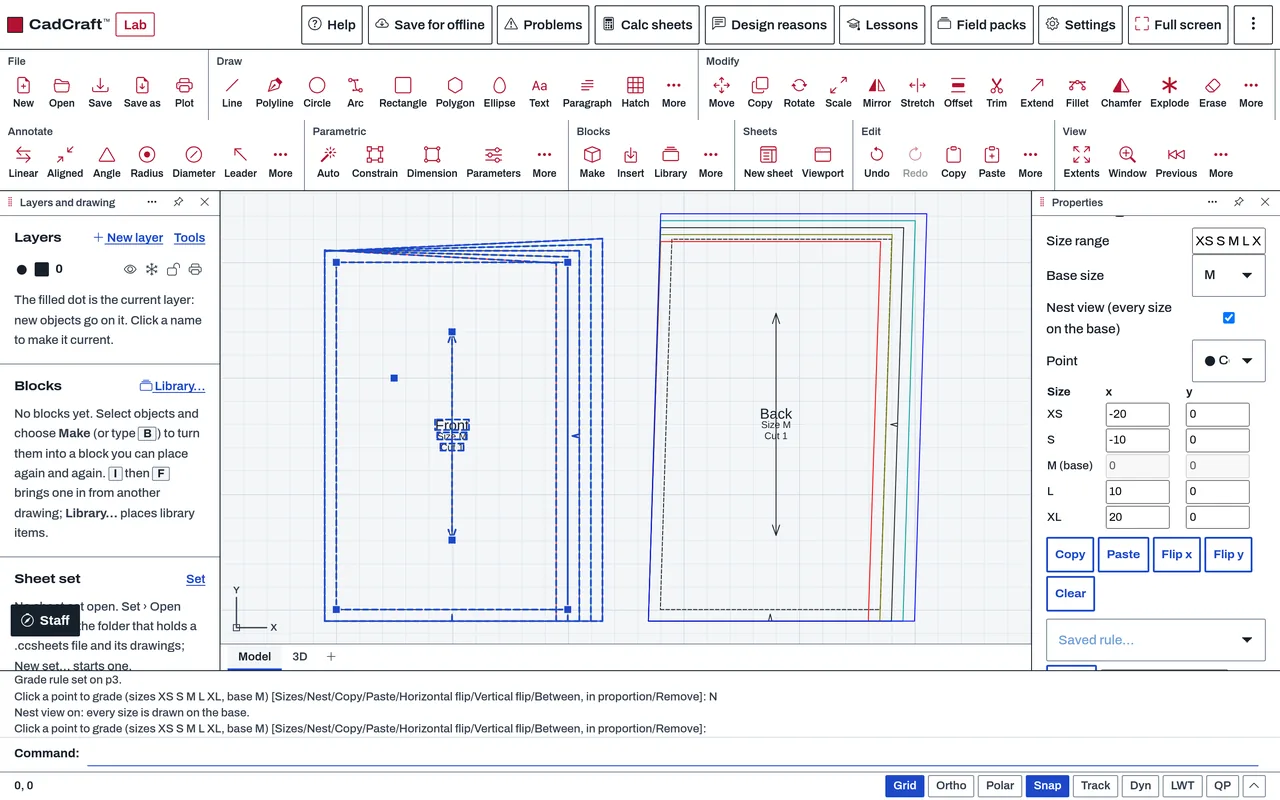
- Give a style its size range and base size with GRADE, and put grade rules on points; GRADERULE saves, applies, exports and imports rules by name.
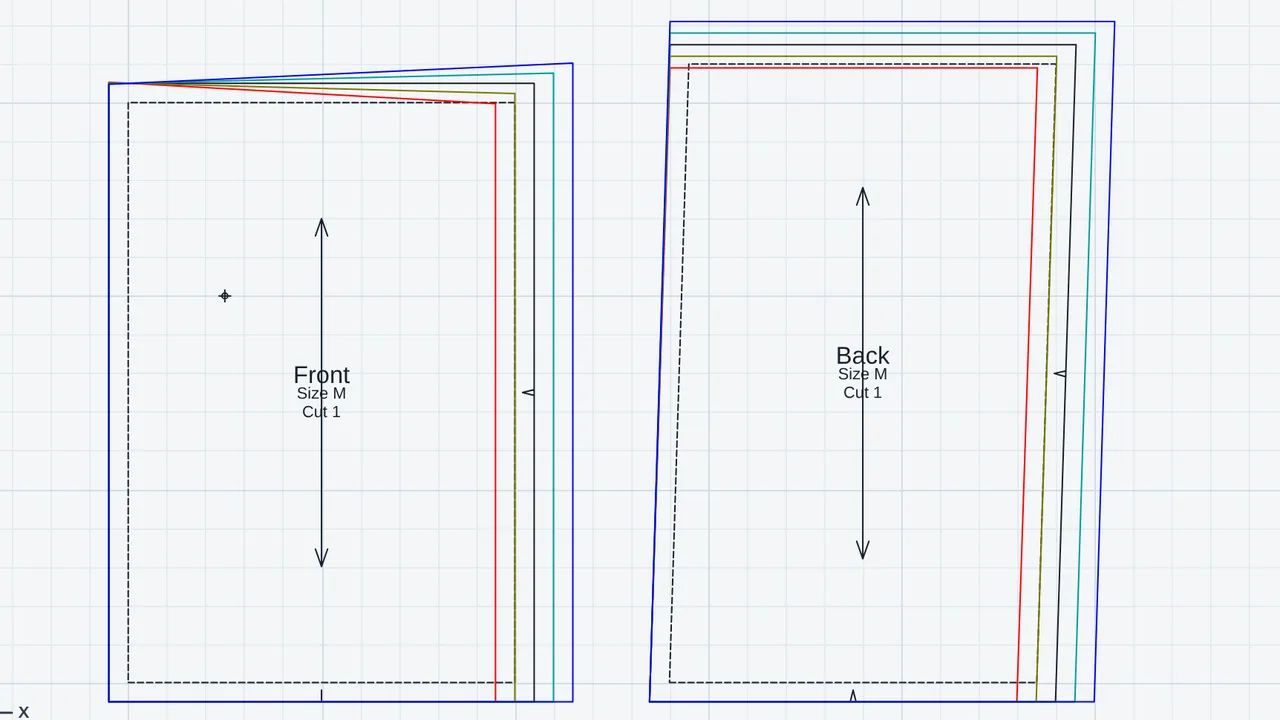
- Check the grading with Nest view, which draws every size on the base in its own colour.
- Measure a sew line with SEAMLENGTH and walk two edges with WALK.
- List every piece in every size with PIECETABLE, and save it as CSV.
- Lay pieces on a fabric by hand with MARKER and MARKERADD, and let MARKERNEST place them (one undo step); save the marker with MARKEROUT as DXF or PDF.
- Print tiled pages on A4 or Letter with overlap, or one full-size page per size on a plotter, with PATTERNPRINT.
- Save pieces as DXF-AAMA or ASTM D6673 with AAMAOUT, and open them with AAMAIN.
Methods and standards
Piece shapes come from the drawn sew line plus the seam allowance; the cut line is redrawn after each change. Grading moves each point by the rule set on it, in each size from the base size, and curve points follow in proportion between the points that move. Markers are checked against the grain line, the fabric width, whether the fabric is one way or may be turned, and overlap. MARKERNEST tries several orders and turns and keeps the shortest result.
Data and sources
No size charts or rule tables are shipped. Size ranges, measurements and grade rules are the ones you type or import. The grade rule library is kept in your browser and works in every drawing; it can be exported as JSON or as a RUL file, and rule tables from other programs can be imported.
Verification
The add-on's Node tests run with node public_html/assets/apps/cadcraft/dev/addons/apparel/test/test.mjs. They cover the piece and seam rules, grading against points worked by hand, marker rules, nesting, printing, and DXF-AAMA files written and read back, with the file also read by a second reader (tools/apparel-test/aama_check.py, which uses ezdxf). Other makers' sample files are read in only when the outside corpus folder is present. Not yet checked against a commercial pattern program's output for the same style.
Limits
A drafting aid for pattern making; the pattern maker checks the result. The automatic marker is an assistant, not an optimiser: it has not been compared with a marker made by a pattern maker, does not match plaids or stripes, and does not split a marker across fabric widths. Pleats, darts that open and close, and adding points to an existing sew line are not built. DXF-AAMA has no layer for buttons and buttonholes, so they are written as internal lines with a note. Opening our DXF-AAMA files in another pattern program has not been tried yet. Very large graded pieces can be thinned on reading, and CadCraft says so.
Files and formats
Reads and writes DWG and DXF drawings. A piece is a block reference with its data kept under the application name CC_APPAREL, so a saved file opens in other CAD programs as the drawn piece. Reads and writes DXF-AAMA and ASTM D6673 pattern files, and the RUL grade rule table. Writes PDF for printing and for markers, CSV for the piece table, and JSON or RUL for the grade rule library.
Get started
- Switch it on in Settings › General › Add-ons › Apparel.
- Draw a closed polyline, type PIECE, pick it, then give the seam allowance and a name.
- Type GRADE to give the sizes and base size, then open Nest view to check the grading.
Languages
The text is available in:
- Afrikaans (af)
- Amharic (am)
- Arabic (ar)
- Azerbaijani (az)
- Belarusian (be)
- Bulgarian (bg)
- Bengali (bn)
- Bosnian (bs)
- Catalan (ca)
- Czech (cs)
- Danish (da)
- German (de)
- Dhivehi (dv)
- Greek (el)
- English (en)
- Spanish (Spain) (es-ES)
- Spanish (Mexico) (es-MX)
- Estonian (et)
- Persian (fa)
- Finnish (fi)
- Filipino (fil)
- French (fr)
- Galician (gl)
- Guarani (gn)
- Hebrew (he)
- Hindi (hi)
- Croatian (hr)
- Hungarian (hu)
- Armenian (hy)
- Indonesian (id)
- Icelandic (is)
- Italian (it)
- Japanese (ja)
- Georgian (ka)
- Kazakh (kk)
- Khmer (km)
- Korean (ko)
- Kyrgyz (ky)
- Lao (lo)
- Lithuanian (lt)
Works in
| Edition | Works | Note |
|---|---|---|
| Browser (/use) (yours) | Added on demand | Fetched the first time you use it, then kept for offline use. |
| Studio from getcadcraft.com | Added on demand | Fetched the first time you use it, then kept for offline use. |
| Microsoft Store | Added on demand | Fetched the first time you use it, then kept for offline use. |
| Google Play | Added on demand | Fetched the first time you use it, then kept for offline use. |
| iPad and iPhone (App Store) | Included; switch it on | Part of the reviewed app; your list switches it on. |
| Custom build | Added on demand | Fetched the first time you use it, then kept for offline use. |
Comes with
Nothing else.
Permissions
- Adds commands
- Adds toolbar buttons and menu items
- Adds a panel section
- Adds settings
- Adds its own objects and data to drawings
- Opens or saves its own file types
From its manifest. Shown again when an update changes them, and the update waits for your yes.
Versions
| Version | Channel | Date | What changed |
|---|---|---|---|
| 0.5.0 | stable | November 9, 2026 | Signed and published. |
Licence and maker
CadCraft (CadCraft, first-party). Licence: Apache-2.0. Dependencies carry their own licences, listed on their pages.