Feature
Cabinets and millwork
Boxes to cut list, nesting, G-code.
Use this add-on:
Overview
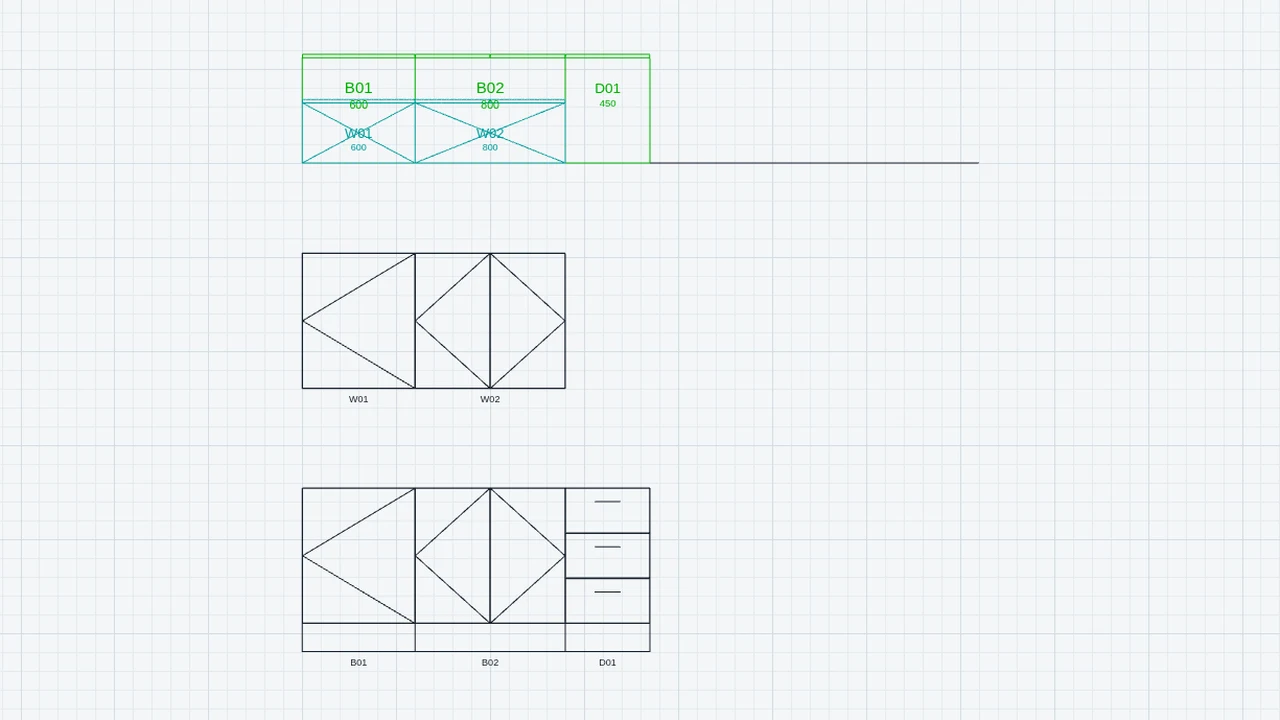
Cabinets is a CadCraft add-on for kitchen and millwork work. You place base, wall, drawer and tall cabinets along a wall in the plan, and it builds every panel from your construction rules. From the drawing it makes a cut list by material, edge-banding totals, a nest of the panels on sheets, a DXF of the sheets for a CAM program, the 32 mm drilling, a hardware list, and a bar-coded label for each piece. It is off until you switch it on.
Who it’s for
- Kitchen and joinery designers: lay out a run of cabinets and check the front elevation of the wall.
- Cabinet shops: take the cut list, the nested sheets, the drilling list and the labels to the saw, router and edgebander.
- Drafters: show a cabinet run in plan, front, side and 3D views.
What you can do
- Place a run along a wall with CABINET: type each width, G for a gap, W for wall cabinets, D for a drawer base, T for a tall cabinet, and U to take the last one back.
- Change a cabinet's size, kind, shelves, doors or drawers in Properties.
- Draw the front view of a wall with CABELEV and a side view through a cabinet with CABSIDE.
- Show the cabinets as solids on the 3D tab with CAB3D, and keep them there with Settings › CadCraft › Cabinets › Keep the cabinets on the 3D tab.
- Get the cut list by material with CABLIST, and export every part as a CSV row (EXPORT › Cabinet cut list (CSV)).
- Nest the panels on sheets with CABNEST, and export the sheets to a DXF (EXPORT › Cabinet sheets, nested (DXF)).
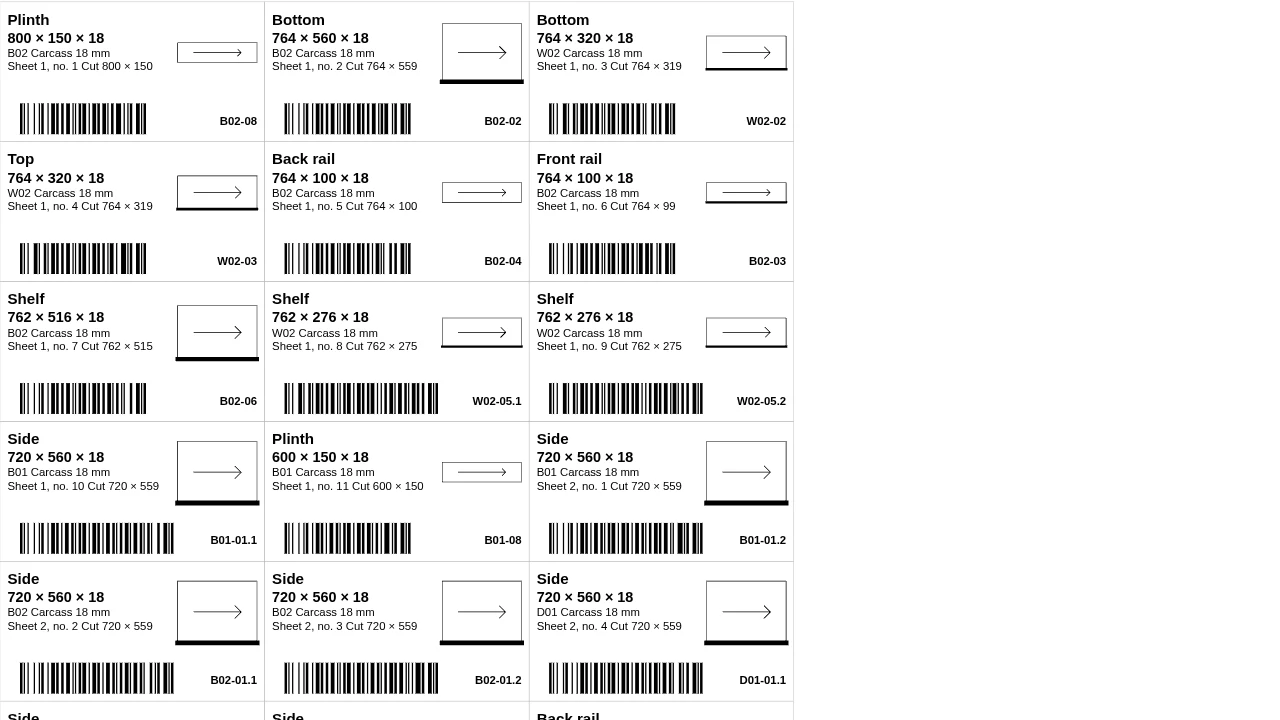
- Print a label with a Code 128 bar code for every piece (EXPORT › Cabinet labels), in the order the pieces come off the sheets if you choose Cutting order (nest).
- List the drilled holes with CABDRILL and export them as CSV, and count the hardware with CABHARD.
Methods and standards
Frameless boxes on the 32 mm system by default. Each part's size is worked out from the construction rules (carcass thickness, door and drawer gaps, back, toe kick), per cabinet. Doors are paired on wide cabinets, and tall cabinets get two rows of doors above a set door height. Hole positions use the 32 mm system numbers, which are construction rules you can change. The rules are common shop practice, not any maker's system. Sheet nesting keeps parts with grain along the sheet's length.
Data and sources
The construction rules and sheet and label sizes are set in Settings › CadCraft › Cabinets, and each cabinet keeps the rules it was built with. No hardware catalogue is shipped; check hole, hinge and slide numbers against your hardware maker's sheet before you drill.
Verification
The add-on's Node tests run with node public_html/assets/apps/cadcraft/dev/addons/cabinet/test/test.mjs. The model is checked against a 600 mm base cabinet with every part size worked by hand (t-model.mjs), the wall run, drawings and job (t-draw.mjs), and drilling and hardware with known answers (t-hardware.mjs). The commands are tested in CadCraft (t-addon.mjs). The cut-list engine has its own test, node tools/cutlist/test.mjs. Not yet checked against a reference shop's cut list.
Limits
A drafting aid, not a shop-approved cut list. Only frameless boxes are built; there are no face-frame cabinets. Corner cabinets, end panels, fillers and worktops are not parts of their own. No G-code is written here: the nested sheets go out as DXF, and PartCraft turns them into G-code once its Manufacture entry for nested sheets is mounted. Drilling is listed and exported as CSV, not as a machine file. Labels have a bar code but no QR code.
Files and formats
Reads and writes DWG and DXF. A cabinet and a front view are each a block reference with their data kept under the application name CC_CABINET. Writes CSV for the cut list, drilling and hardware; DXF for the nested sheets, with the layers SHEET, PARTS and LABELS; and HTML label pages for printing at 100 %.
Get started
- Switch it on in Settings › General › Add-ons › Cabinets.
- Type CABINET, click the two ends of a wall, then type the widths, for example 600 and 800.
- Type CABLIST for the cut list and CABNEST for the sheets, then use EXPORT to save the CSV, DXF or labels.
Languages
The text is available in:
- Afrikaans (af)
- Amharic (am)
- Arabic (ar)
- Azerbaijani (az)
- Belarusian (be)
- Bulgarian (bg)
- Bengali (bn)
- Bosnian (bs)
- Catalan (ca)
- Czech (cs)
- Danish (da)
- German (de)
- Dhivehi (dv)
- Greek (el)
- English (en)
- Spanish (Spain) (es-ES)
- Spanish (Mexico) (es-MX)
- Estonian (et)
- Persian (fa)
- Finnish (fi)
- Filipino (fil)
- French (fr)
- Galician (gl)
- Guarani (gn)
- Hebrew (he)
- Hindi (hi)
- Croatian (hr)
- Hungarian (hu)
- Armenian (hy)
- Indonesian (id)
- Icelandic (is)
- Italian (it)
- Japanese (ja)
- Georgian (ka)
- Kazakh (kk)
- Khmer (km)
- Korean (ko)
- Kyrgyz (ky)
- Lao (lo)
- Lithuanian (lt)
Works in
| Edition | Works | Note |
|---|---|---|
| Browser (/use) (yours) | Added on demand | Fetched the first time you use it, then kept for offline use. |
| Studio from getcadcraft.com | Added on demand | Fetched the first time you use it, then kept for offline use. |
| Microsoft Store | Added on demand | Fetched the first time you use it, then kept for offline use. |
| Google Play | Added on demand | Fetched the first time you use it, then kept for offline use. |
| iPad and iPhone (App Store) | Included; switch it on | Part of the reviewed app; your list switches it on. |
| Custom build | Added on demand | Fetched the first time you use it, then kept for offline use. |
Comes with
Nothing else.
Needed by: Interior design and millwork.
Permissions
- Adds commands
- Adds toolbar buttons and menu items
- Adds a panel section
- Adds settings
- Adds its own objects and data to drawings
- Opens or saves its own file types
From its manifest. Shown again when an update changes them, and the update waits for your yes.
Versions
| Version | Channel | Date | What changed |
|---|---|---|---|
| 0.8.0 | stable | October 30, 2026 | Signed and published. |
Licence and maker
CadCraft (CadCraft, first-party). Licence: Apache-2.0. Dependencies carry their own licences, listed on their pages.