Feature
Concrete and seismic design
Concrete members, slabs, walls, seismic loads.
Use this add-on:
Overview
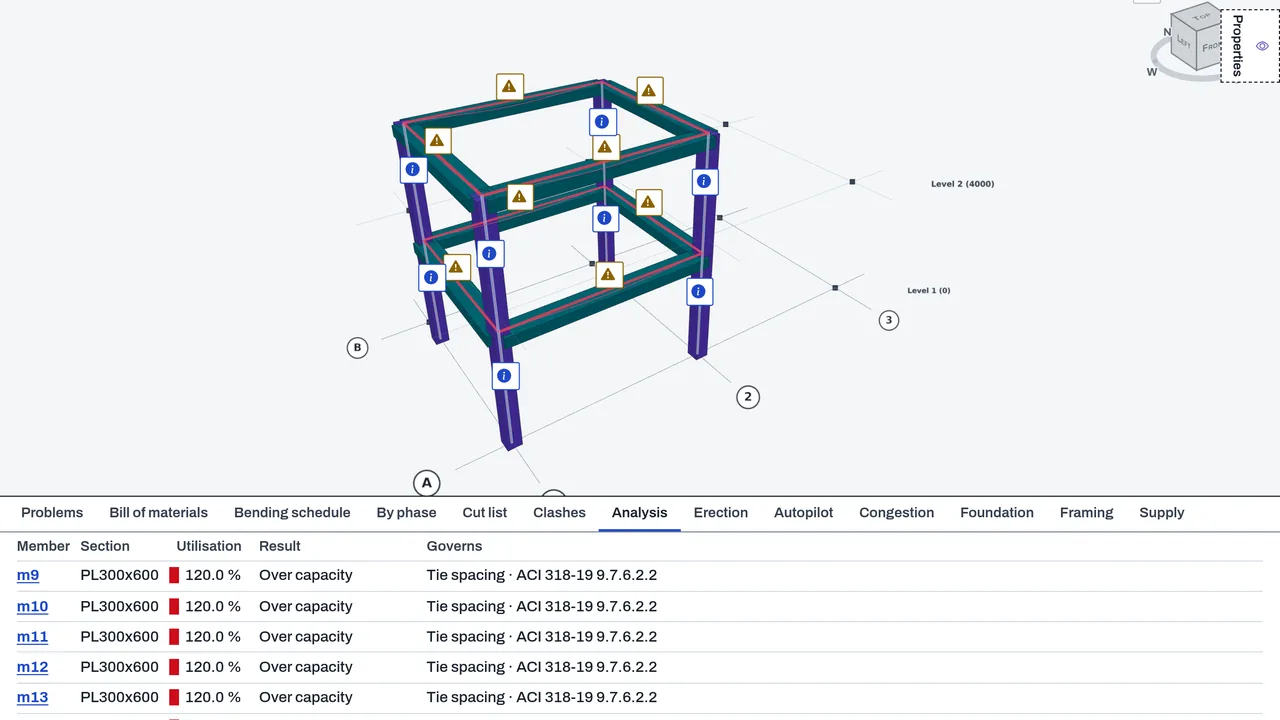
Concrete checks reinforced concrete beams and columns in a DetailCraft frame to ACI 318-19, and makes equivalent lateral seismic forces on rigid floors to ASCE/SEI 7-22 with a storey drift check. It also works out the steel for concrete slabs from the plate moments. It is an aid for an engineer to review. Today it is part of DetailCraft's core.
Who it’s for
- Structural engineers: check concrete beams and columns against ACI 318-19 and see the utilisation on the model.
- Detailers: set the bars, ties and cover of each concrete member and print the report.
- Engineers designing for earthquake loads: make the equivalent lateral forces, check storey drift, and take the period from the analysis.
What you can do
- Set a section up as concrete with Set up as concrete… in the Concrete members block of the Analysis tab: cover, top, bottom and side bars, the ties, and whether it acts as a beam, a column or is decided from its forces.
- Make combinations (the ACI 318-19 strength combinations of ASCE 7) and press Check concrete. Each member gets a utilisation, coloured on the model like the steel checks.
- Check slender columns in a non-sway frame for the magnified moment, with the sustained share of load you type.
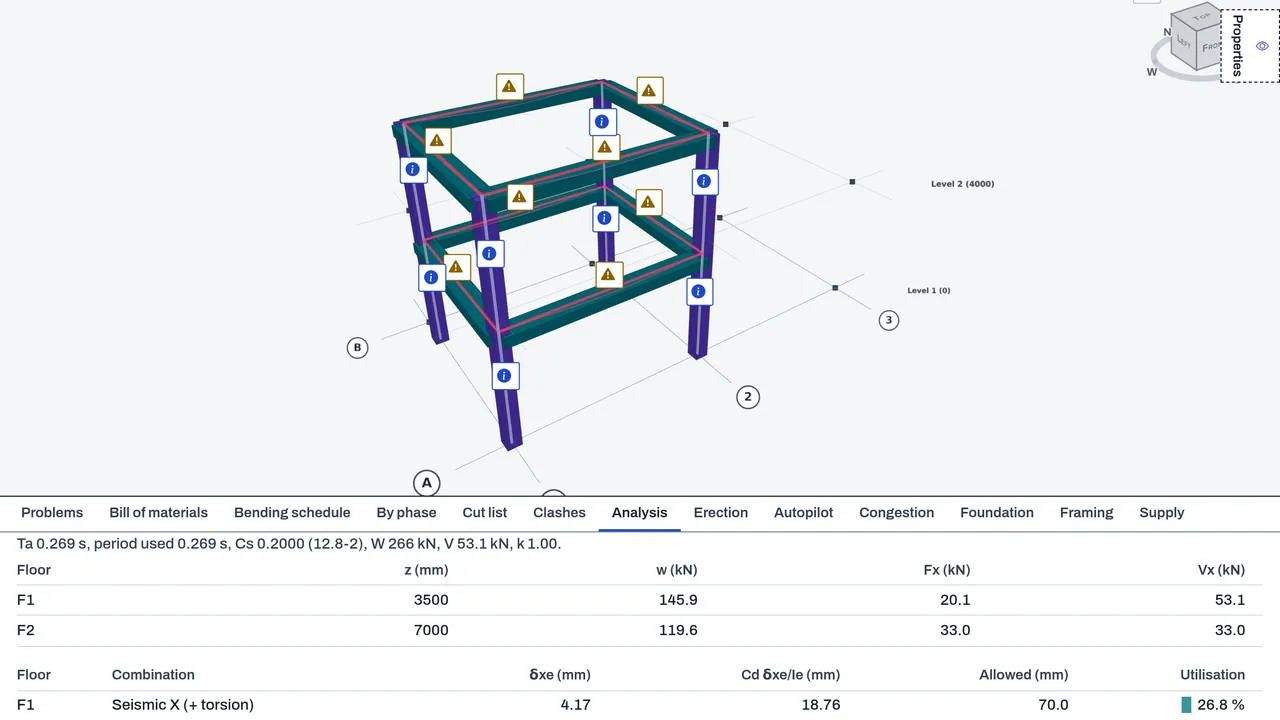
- Find the floors in the Seismic loads block, give each one its seismic weight, and press Make seismic cases for X and Y, with 5 % accidental torsion.
- Take the period from the analysis (Rayleigh's method), capped at Cu·Ta.
- Work out the bottom and top steel per metre of a slab from the plate moments in the Slab reinforcement block, with one-way shear against φVc.
- Add the concrete tables, seismic parameters, floor forces and drift table to Report (PDF) and Report (CSV).
Methods and standards
ACI 318-19 (SI) for rectangular nonprestressed sections: flexure by strain compatibility with the stress block, tension-controlled strain, shear with the ties, axial load with moment for columns, with Bresler's method for two-way bending, and the minimum steel. Seismic loads follow ASCE/SEI 7-22 chapter 12 (equivalent lateral force, with the period from Table 12.8-2 or the analysis). Storey drift follows Table 12.12-1. Slab steel uses the Wood–Armer rule, which combines bending and twisting moments.
Data and sources
Concrete properties (f′c, fy, fyt, cover, bars and ties), the seismic design values (SDS, SD1, S1, R, Ie, Cd, TL, the structural system and the risk category) and the load cases are typed or read from your model. The code tables are built in and cited by clause in the results. The add-on does not look up seismic values for a site.
Verification
tools/frame/test-rc.mjs checks the ACI 318-19 member checks, with every expected number worked by hand in the file. tools/frame/test-slab.mjs checks the slab steel, including a simply supported square slab against Timoshenko's plate theory. tools/frame/test-period.mjs checks the Rayleigh period against the closed form for one degree of freedom. tools/frame/test-concrete.mjs covers settings, floors, seismic cases, drift and report tables on a two-storey concrete frame. tools/frame/test-loads.mjs covers the ASCE 7-22 seismic loads. Not yet checked against an engineer's design of a reference frame.
Limits
An aid for an engineer to review, not a design approval. Concrete checks use first-order forces; a column in a sway frame is marked partly checked, because its magnification needs a second-order analysis that is not built. There is no torsion design, no ACI chapter 18 seismic detailing and no tie detailing beyond the spacing check. Seismic loads leave out the redundancy factor, the vertical seismic effect, torsional amplification and P-delta effects. Wind loads are not built. Only rectangular sections are checked. The slab check does not cover deflection, punching at columns or trimmer bars at openings.
Files and formats
Reads the DetailCraft model, its sections, plates and analysis results. The concrete and seismic settings are saved with the model. Writes the seismic load cases into the model. Reports are written as PDF and CSV.
Get started
- Draw the concrete members as rectangles, for example PL300x600 for a beam and PL400x400 for a column.
- In the Analysis tab, open Concrete members, press Set up as concrete… on each section, then Make combinations and Check concrete.
- For earthquake loads, open Seismic loads, press Find floors, give the weights and design values, then press Make seismic cases.
Languages
No languages are listed for this add-on yet. Its maker may add some.
Works in
| Edition | Works | Note |
|---|---|---|
| Browser (/use) (yours) | Added on demand | Fetched the first time you use it, then kept for offline use. |
| Studio from getcadcraft.com | Added on demand | Fetched the first time you use it, then kept for offline use. |
| Microsoft Store | Added on demand | Fetched the first time you use it, then kept for offline use. |
| Google Play | Added on demand | Fetched the first time you use it, then kept for offline use. |
| iPad and iPhone (App Store) | Included; switch it on | Part of the reviewed app; your list switches it on. |
| Custom build | Added on demand | Fetched the first time you use it, then kept for offline use. |
Comes with
- Frames and FEA 1.5 MB
Adding it brings these too. Engines are shared: each downloads once for every add-on that uses it.
Needed by: Security and blast-resistant design, Structural engineering.
Versions
| Version | Channel | Date | What changed |
|---|---|---|---|
| 1.0.0 | stable | October 28, 2026 | First version in the Library. |
Licence and maker
CadCraft (CadCraft, first-party). Licence: Apache-2.0. Dependencies carry their own licences, listed on their pages.