Feature
Text to diagram
Mermaid, PlantUML, D2 drawn as editable CAD.
Use this add-on:
Overview
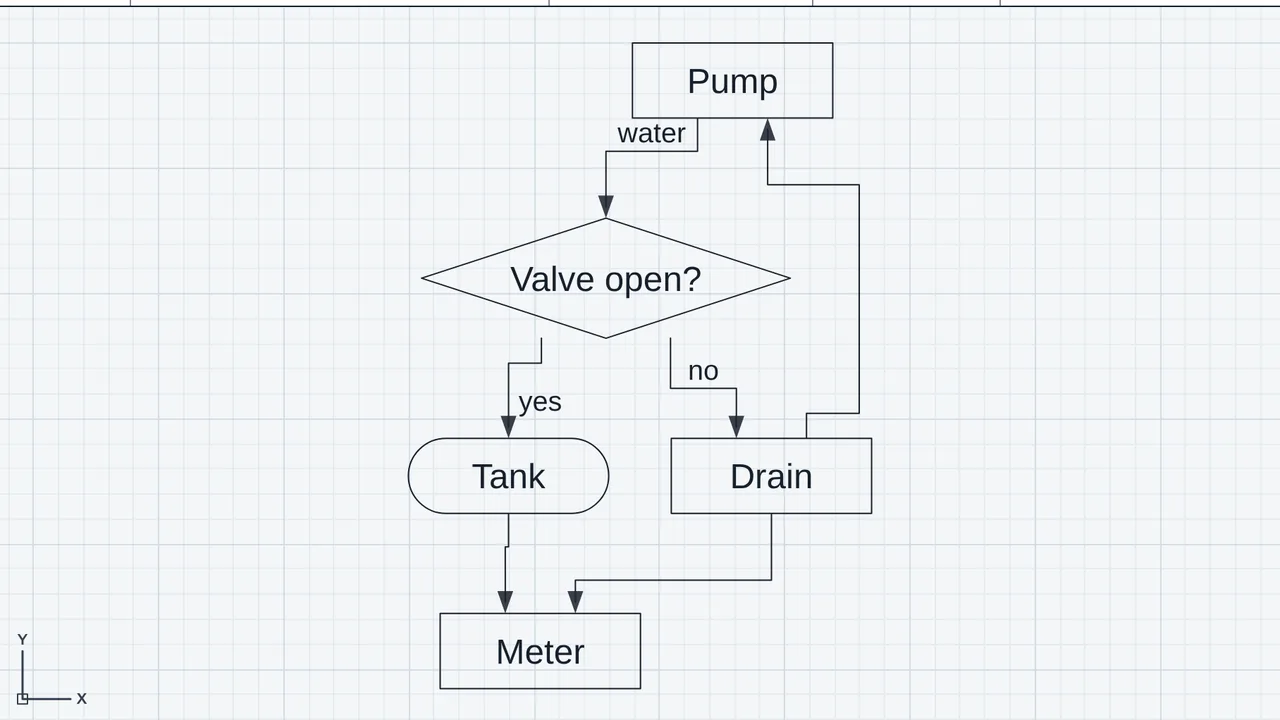
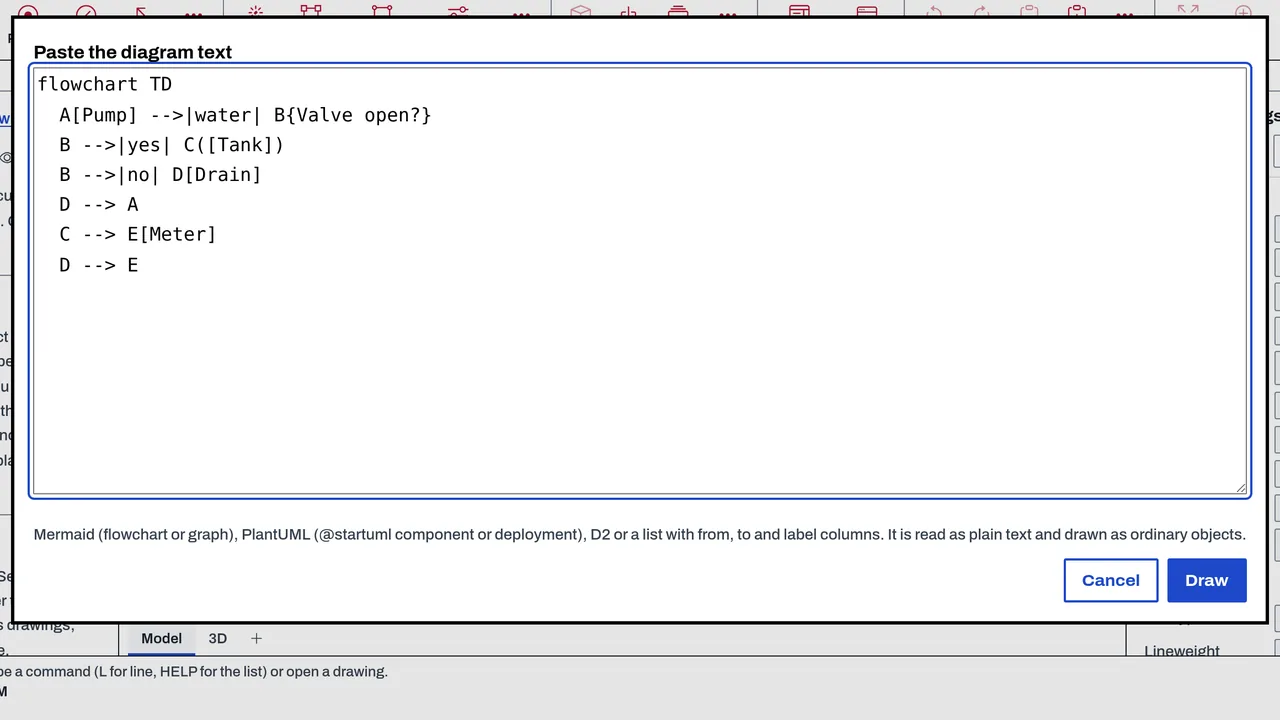
Text to diagram draws a flowchart or component diagram from text as ordinary CadCraft objects. Paste Mermaid, PlantUML (a component and deployment subset), D2 or a from-to list into the DIAGRAM command, and the blocks and connectors are placed on a layer called Diagram. You can then move and edit them like any other drawing object. It is part of CadCraft's core today.
Who it’s for
- Engineers and drafters who write a process, control or network diagram as text first and need it on a drawing sheet.
- Anyone who keeps flowcharts in Mermaid or D2 and wants them as editable CAD drawings.
- Teams whose tools generate diagram text and who need a drawing from it.
What you can do
- Type DIAGRAM (also TEXTDIAGRAM), paste the text into the box, then pick the top-left corner and give the text height. The whole diagram is one undo step.
- Enter a one-line text with ; between statements at the command line.
- Read Mermaid flowcharts (graph TD, TB, BT, LR and RL), D2 basics, PlantUML component and deployment diagrams, and a from-to list with from, to, label and type columns.
- Edit the blocks and connectors afterwards: they are ordinary objects on the layer Diagram, selected when the command ends.
Methods and standards
A layered layout: each node goes in the layer set by the longest path from the start, back edges are reversed, nodes are ordered by their barycentre with virtual nodes, and connectors are drawn orthogonally with their labels placed on them. Blocks are rectangles, a diamond for a decision, or a rounded block, as the source shape says.
Data and sources
No data ships. The diagram is made from the text you paste, and the text is the source you keep.
Verification
tools/cadcraft-test/browser-08.mjs (its SU.883 section) pastes a Mermaid flowchart, checks the count of blocks and connectors read and drawn, and checks what the history reports. Not yet checked against a set of reference diagrams in each language.
Limits
Only the parts of each language listed here are read. Subgraphs are drawn as blocks without their box. Styling (classDef, class, style, linkStyle, click), sequence diagrams, notes, skinparam, packages and D2 containers or styles are skipped, and the count of skipped lines is reported. The layout is automatic and is not adjusted by hand.
Files and formats
Reads the pasted text (Mermaid, PlantUML, D2 or CSV). Writes the blocks and connectors into the open CadCraft drawing, on the layer Diagram; the drawing is saved as DWG or DXF.
Get started
- Type DIAGRAM.
- Paste the Mermaid, PlantUML, D2 or from-to text into the box, then give the top-left corner and the text height.
- Select and edit the blocks and connectors as you would any objects on the Diagram layer.
Languages
No languages are listed for this add-on yet. Its maker may add some.
Works in
| Edition | Works | Note |
|---|---|---|
| Browser (/use) (yours) | Added on demand | Fetched the first time you use it, then kept for offline use. |
| Studio from getcadcraft.com | Added on demand | Fetched the first time you use it, then kept for offline use. |
| Microsoft Store | Added on demand | Fetched the first time you use it, then kept for offline use. |
| Google Play | Added on demand | Fetched the first time you use it, then kept for offline use. |
| iPad and iPhone (App Store) | Included; switch it on | Part of the reviewed app; your list switches it on. |
| Custom build | Added on demand | Fetched the first time you use it, then kept for offline use. |
Comes with
- Schematics and connectivity 800 KB
Adding it brings these too. Engines are shared: each downloads once for every add-on that uses it.
Needed by: Electrical controls and automation (schematics, PLC panels).
Versions
| Version | Channel | Date | What changed |
|---|---|---|---|
| 1.0.0 | stable | October 28, 2026 | First version in the Library. |
Licence and maker
CadCraft (CadCraft, first-party). Licence: Apache-2.0. Dependencies carry their own licences, listed on their pages.