Feature
Erection sequence
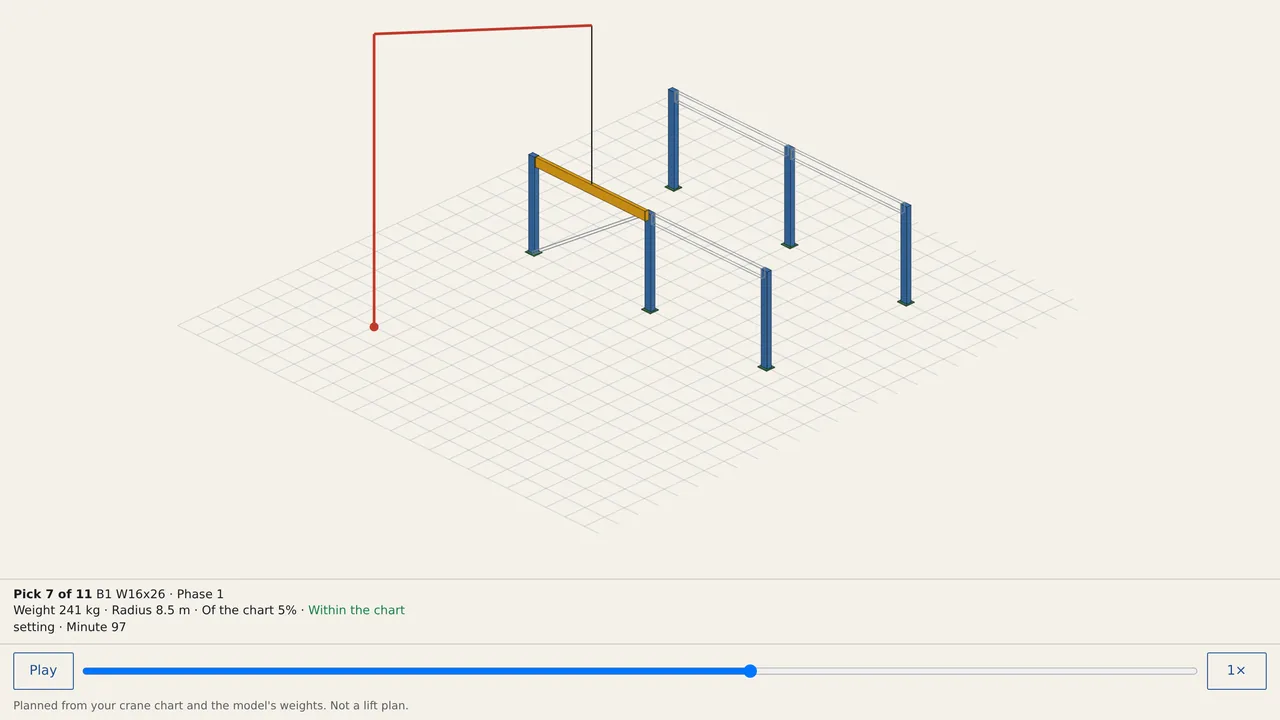
Erection movie and constructability.
Use this add-on:
Overview
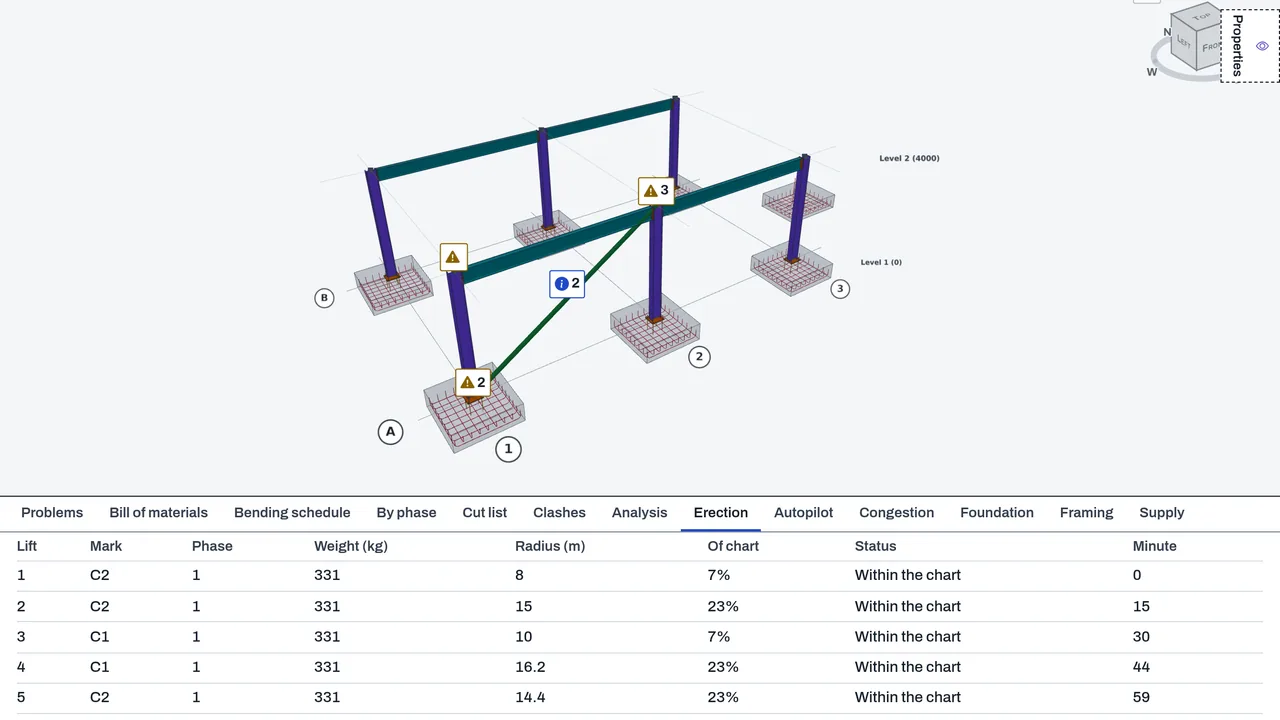
The Erection tab in DetailCraft turns the model into an erection order and checks each lift against a crane you describe. You give the crane's position, its highest hook, the rigging and its load chart. The tab orders the lifts by phase and tier, checks each one against the chart at its radius, and saves an erection movie as one HTML file that plays offline in any browser. It plans from the numbers you type. It is not a lift plan.
Who it’s for
- Steel erectors and site supervisors who want an order of lifts and the picks that need a bigger crane or a different setup.
- Crane planners who want each pick checked against the chart from the crane supplier.
- Engineers and clients who want the erection sequence as a movie that plays on a phone.
What you can do
- Add a crane (Add a crane): its centre X and Y, the highest hook, the hook block and rigging not in the chart, and the load chart as rows of radius and capacity.
- See one lift per assembly (a beam with its end plates, a column with its base plate, a stair) in phase order and tier by tier, each with its weight, radius, share of the chart and start minute.
- Set Most of the chart a lift may use as your margin. A lift over it is marked Over your margin; above the chart, Over the chart; beyond the last radius, Past the chart; and a part higher than the hook, Hook too low.
- Add a second crane; each lift goes to the first crane that can take it within your margin.
- Press Save movie for one HTML file that plays offline, with play and pause, a bar to any minute, turning with a finger and pinch zoom. Press CSV for the lift table.
- Read Problems for every lift that is over, past or too high, and for a beam with no connection to carry it, which needs temporary support.
Methods and standards
The load chart is read the way a crane chart is read: the capacity listed for a radius holds out to that radius, so a load between two rows takes the capacity of the farther row, never a value between them. Inside the first row the first row's capacity holds; beyond the last row the crane cannot lift. The radius that counts is the larger of the pick-up and set radii. Weights are the model's gross weights plus a rigging percentage you set.
Data and sources
The add-on ships no crane data. You type the chart, copied from the crane's own chart. Member weights come from the model.
Verification
tools/detailcraft-test/test-erection.mjs: 41 passed, 0 failed. tools/detailcraft-test/test-erection-app.mjs: 22 passed, 0 failed (the erection, autopilot, foundation and framing tools, and file round trips). Browser passes: browser-erection.mjs and browser-erection-movie.mjs (a phone-size file). Recorded in docs/0.8-sessions/detail_PART_2.md and detail_PART_3.md. Not yet checked against a real crane lift plan.
Limits
Not a lift plan: the rigger and the crane operator make that. Weights are gross: holes and copes are not deducted, and bolts are covered only by the rigging percentage. The add-on uses only the chart you typed. The movie draws the model as plain boxes: it shows the order and the lifts, not the true profiles. Your margin is your choice.
Files and formats
The crane and its chart are saved in the DetailCraft model file, and every change is one undo step. Writes the erection movie as one HTML file, and the lift table as CSV.
Get started
- Open the Erection tab in DetailCraft, with a model that has steel members.
- Press Add a crane and type its position, its highest hook and its load chart.
- Read the lift order and Problems, then press Save movie or CSV.
Languages
No languages are listed for this add-on yet. Its maker may add some.
Works in
| Edition | Works | Note |
|---|---|---|
| Browser (/use) (yours) | Added on demand | Fetched the first time you use it, then kept for offline use. |
| Studio from getcadcraft.com | Added on demand | Fetched the first time you use it, then kept for offline use. |
| Microsoft Store | Added on demand | Fetched the first time you use it, then kept for offline use. |
| Google Play | Added on demand | Fetched the first time you use it, then kept for offline use. |
| iPad and iPhone (App Store) | Included; switch it on | Part of the reviewed app; your list switches it on. |
| Custom build | Added on demand | Fetched the first time you use it, then kept for offline use. |
Comes with
Nothing else.
Needed by: Structural engineering.
Versions
| Version | Channel | Date | What changed |
|---|---|---|---|
| 1.0.0 | stable | October 28, 2026 | First version in the Library. |
Licence and maker
CadCraft (CadCraft, first-party). Licence: Apache-2.0. Dependencies carry their own licences, listed on their pages.