Feature
Material handling
Conveyors, stations, AGVs, PLC emulation.
Use this add-on:
Overview
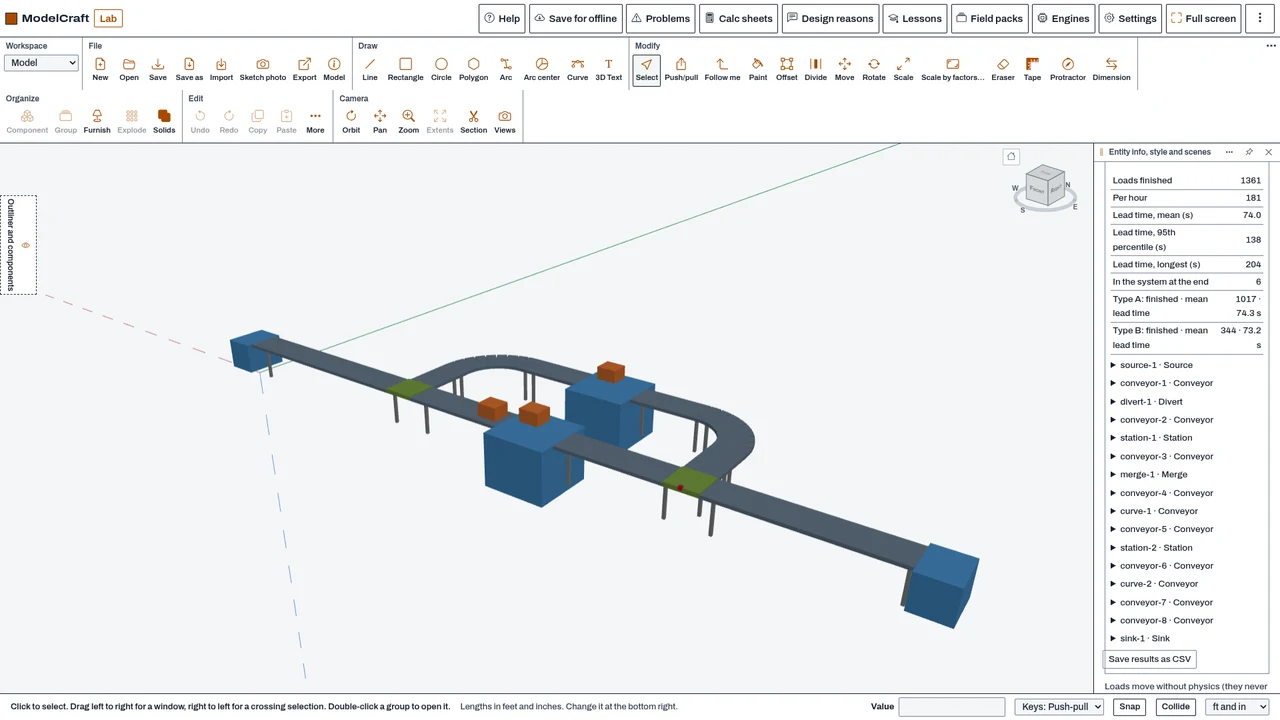
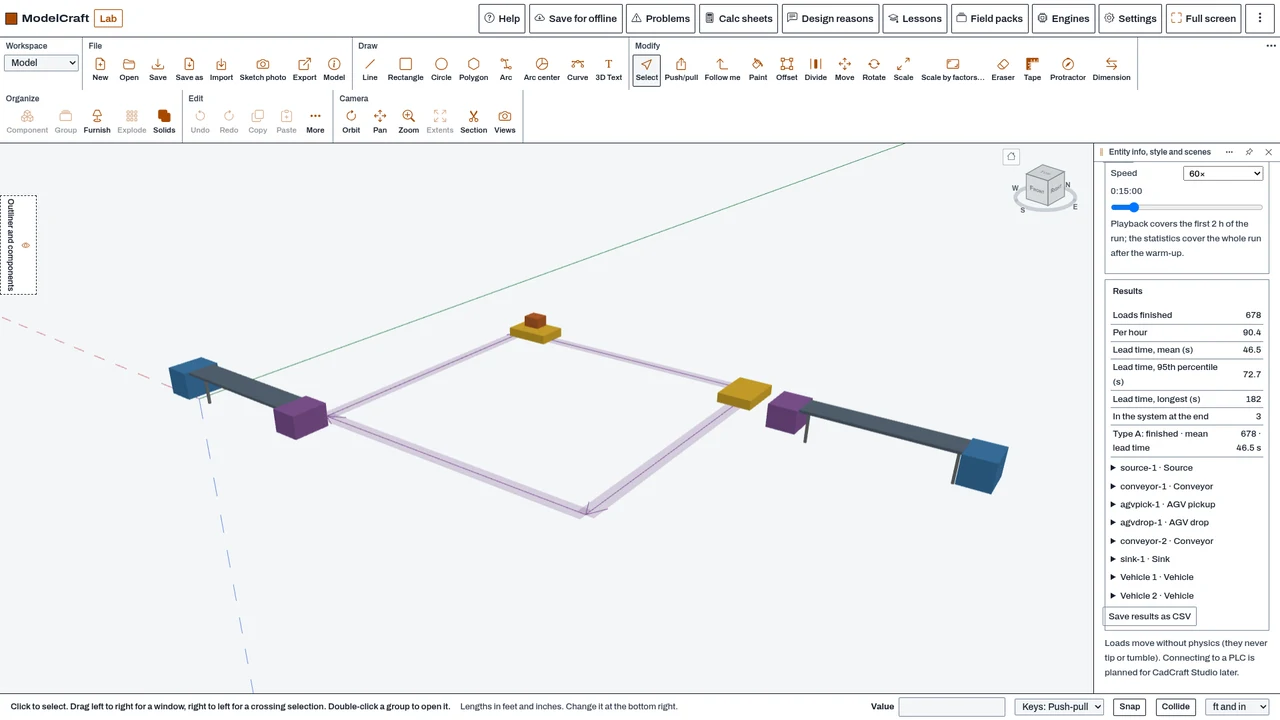
Material flow lays out a material-handling system in ModelCraft's 3D view and simulates it. You place conveyors, curves, inclines, zone conveyors, merges, diverts, stop gates, photo-eyes, stations, buffers and AGV paths, which snap port to port. A seeded discrete-event simulation then gives throughput, lead times, utilisation and queues, and you can play the run back in 3D. Loads are moved by rules, not by physics. Connecting a PLC is not built.
Who it’s for
- Industrial and material-handling engineers who want to test the capacity of a conveyor or warehouse layout before it is built.
- Operations planners who compare shift patterns, station times or the effect of breakdowns.
- Teachers and students of queueing who want a run to set against the textbook answers.
What you can do
- Press Example line to put a source, a conveyor, a divert, two stations, a merge and a sink in the 3D view, then press Run to simulate eight hours.
- Add items from the catalog (Add from the catalog). Join to chooses the free output an item follows; Place with mouse and drag move items, and holding Shift moves a whole joined line.
- Set a shift calendar (Shift calendars) and choose it for a station or a source; a station starts no new work while its calendar is off.
- Set breakdowns on stations and belts: time between breakdowns and mean repair time.
- Lay out AGV paths as one-way segments or two-way lanes, with an AGV pickup and drop and an AGV fleet; press Example AGVs for a loop with two vehicles.
- Run in a worker with a progress line and Cancel, or press Live to run at the pace of the clock. Play back the run in 3D at a chosen speed.
- Read Results: loads finished per hour, lead times, utilisation and queues for each station, and each vehicle's time. Save results as CSV.
- Bring arrivals from a CSV file instead of random times (Orders from a file): the same file gives the same run, and a row that cannot be read stops the load and is named.
Methods and standards
A seeded discrete-event simulation: random times come from the Random seed, and ties are broken by a sequence number, so the same layout and seed give the same results on any computer. Belts move loads at their speed and keep the spacing you set. Breakdowns follow an exponential time between failures and an Erlang-2 repair time. Availability is the time between breakdowns divided by that plus the repair time. Warm-up minutes are simulated but not counted.
Data and sources
One sample data file: made-up orders (about 130 rows over two hours, a rush of cartons at the 40-minute mark) for trying Orders from a file. It is invented for this purpose, belongs to no warehouse, and is in the add-on's data folder as orders-sample.csv. The layout, the times, the shifts and the rules are otherwise the person's own. The Example line and Example AGVs are built in.
Verification
public_html/assets/apps/modelcraft/dev/addons/flow/test/test.mjs: 220 passed, 0 failed. test/browser.mjs: 34 passed, 0 failed in headless Chromium. The known answers are the queueing and hand-worked cases listed under Results in the add-on's help: a station with random arrivals and fixed service at 80 % load (mean wait within 4 % of the theory), a belt's travel time and capacity, merge priority, every divert rule, and breakdown availability within 3 %. Recorded in docs/0.8-sessions/flow-08.md.
Limits
No physics: loads never tip, collide or fall, and a belt moves loads at its speed without acceleration. AGVs have no battery charging, vehicle sizes or parking places yet; a head-on jam in a single corridor stops the run and says so. Breakdowns apply to stations and belts only, not gates, zone conveyors or vehicles. There are no operator pools. Live keeps the first 200 000 load positions for the 3D view. Not built: PLC emulation (planned for CadCraft Studio, which can talk to a PLC; the web edition simulates only), robots, cranes, shuttles, lifts, pallet and tote stacks. It is a planning tool, not a control system.
Files and formats
The layout is saved in the ModelCraft .modelcraft file with the model, and can also be saved and opened as a .ccflow.json file. Results export as CSV, one row per element and measure, at full precision. Playback is drawn in the 3D view.
Get started
- Switch it on in Settings › General › Add-ons › Material flow, then open the Material flow section of the right panel.
- Press Example line, then Run. Results shows the loads finished and the lead times.
- Press Play to watch the run, or Save results as CSV to open it in a spreadsheet.
Languages
The text is available in:
- Afrikaans (af)
- Amharic (am)
- Arabic (ar)
- Azerbaijani (az)
- Belarusian (be)
- Bulgarian (bg)
- Bengali (bn)
- Bosnian (bs)
- Catalan (ca)
- Czech (cs)
- Danish (da)
- German (de)
- Dhivehi (dv)
- Greek (el)
- English (en)
- Spanish (Spain) (es-ES)
- Spanish (Mexico) (es-MX)
- Estonian (et)
- Persian (fa)
- Finnish (fi)
- Filipino (fil)
- French (fr)
- Galician (gl)
- Guarani (gn)
- Hebrew (he)
- Hindi (hi)
- Croatian (hr)
- Hungarian (hu)
- Armenian (hy)
- Indonesian (id)
- Icelandic (is)
- Italian (it)
- Japanese (ja)
- Georgian (ka)
- Kazakh (kk)
- Khmer (km)
- Korean (ko)
- Kyrgyz (ky)
- Lao (lo)
- Lithuanian (lt)
Works in
| Edition | Works | Note |
|---|---|---|
| Browser (/use) (yours) | Added on demand | Fetched the first time you use it, then kept for offline use. |
| Studio from getcadcraft.com | Added on demand | Fetched the first time you use it, then kept for offline use. |
| Microsoft Store | Added on demand | Fetched the first time you use it, then kept for offline use. |
| Google Play | Added on demand | Fetched the first time you use it, then kept for offline use. |
| iPad and iPhone (App Store) | Included; switch it on | Part of the reviewed app; your list switches it on. |
| Custom build | Added on demand | Fetched the first time you use it, then kept for offline use. |
Comes with
- Discrete-event and people 700 KB
- PLC and controls 700 KB
Adding it brings these too. Engines are shared: each downloads once for every add-on that uses it.
Needed by: Industrial engineering (factory layout, workflow, ergonomics).
Permissions
- Adds a panel section
- Opens or saves its own file types
From its manifest. Shown again when an update changes them, and the update waits for your yes.
Versions
| Version | Channel | Date | What changed |
|---|---|---|---|
| 0.9.0 | stable | November 9, 2026 | Signed and published. |
Licence and maker
CadCraft (CadCraft, first-party). Licence: Apache-2.0. Dependencies carry their own licences, listed on their pages.