Feature
Foundation design
Footings, mats, piles, retaining walls.
Use this add-on:
Overview
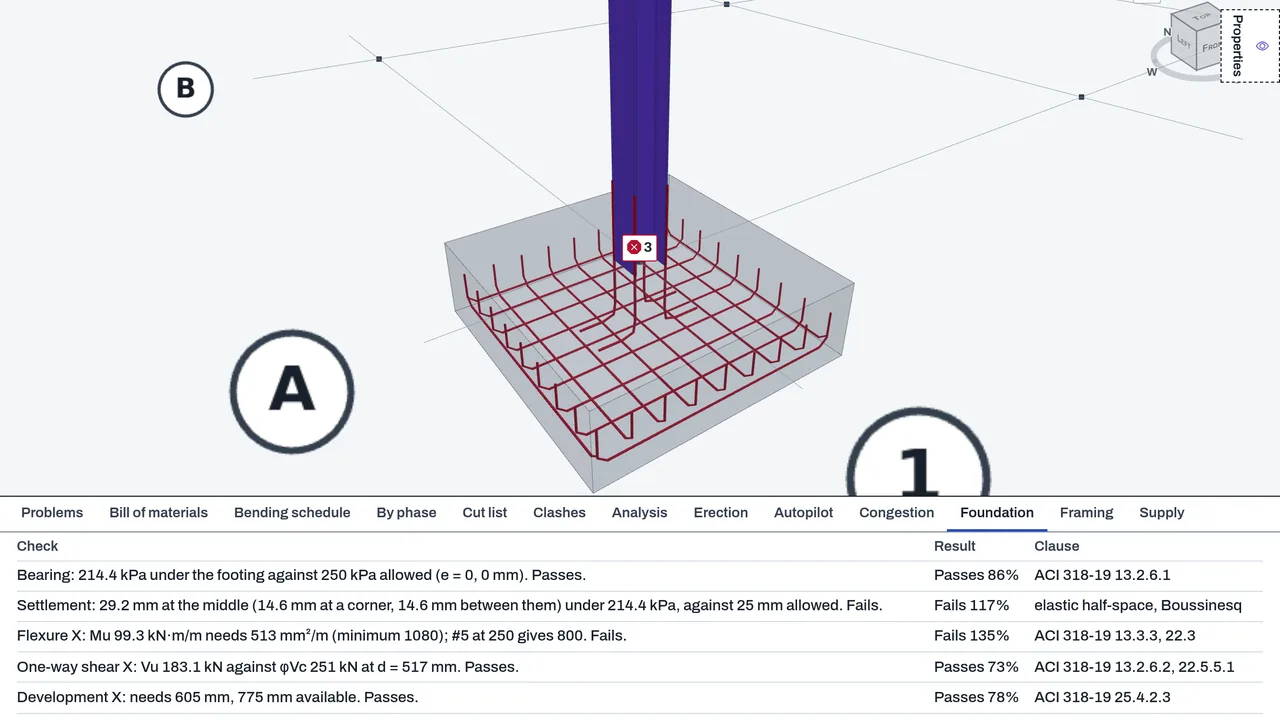
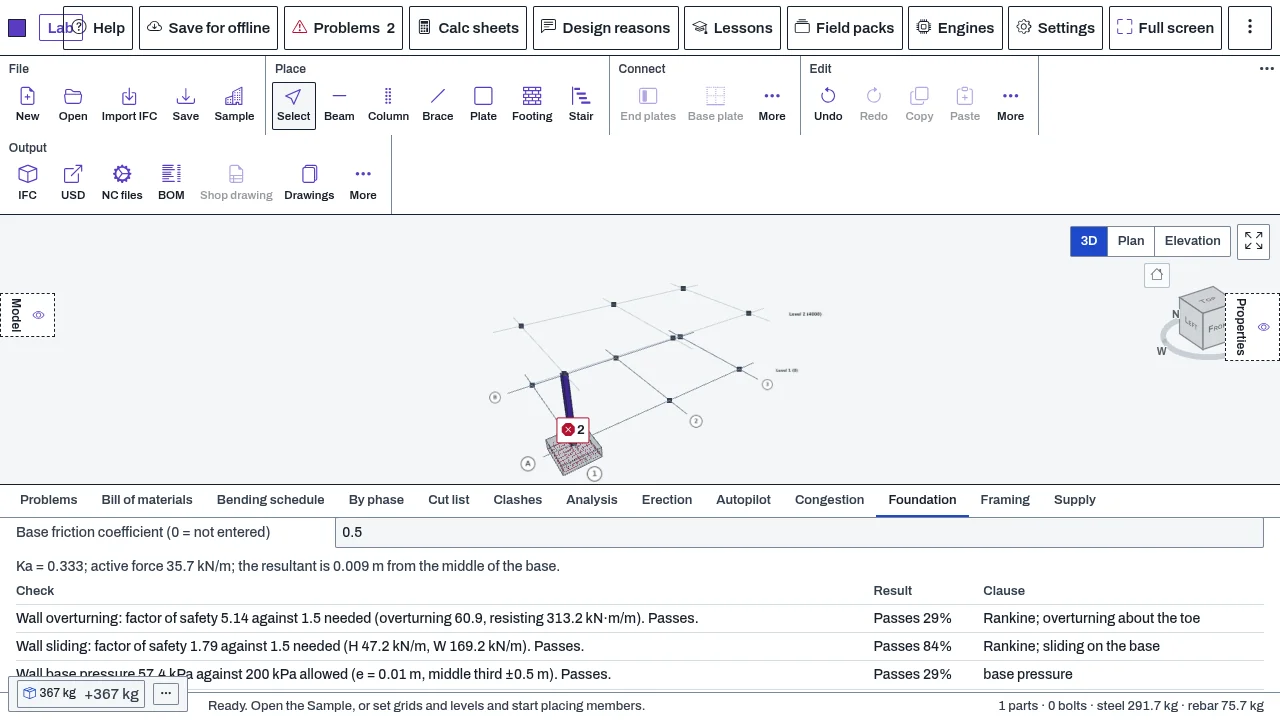
Design checks for footings, combined footings and mats in DetailCraft's Foundation tab, against the column loads and the soil you give. The checks cover bearing, sliding, overturning and settlement from the service loads, and flexure, one-way shear, punching, bar development and minimum steel from the factored loads. The tab also analyses a mat as a plate on springs, and has calculators for pile groups and cantilever retaining walls. The results are a first-order aid for an engineer to review. They are not a design sign-off.
Who it’s for
- Structural engineers who check footings, mats and retaining walls in a model before a calculation sheet is signed.
- Detailers who need the footing bars and the checks that go with a drawing.
- Geotechnical and structural engineers who want bearing and settlement from their own soil values.
What you can do
- Describe the soil (Describe the soil): the allowable bearing pressure, the base friction coefficient, the soil modulus Es with its Poisson's ratio, and the settlement you allow.
- Add column loads with Add a column load: the service row for bearing, sliding and overturning, and the factored row for the strength checks. Or press Take column loads from the Analysis to use the support reactions of the Analysis tab.
- Tick Analyse this footing as a flexible mat on springs to model a mat with many columns on a bed of springs, with the subgrade modulus ks.
- Add a pile group (Add a pile group) to check the pile reactions by the elastic method, and a retaining wall (Add a retaining wall) for a cantilever wall on level backfill.
- Read every failed check in Problems with its clause.
Methods and standards
Concrete checks follow ACI 318-19: chapter 13 for footings, chapter 22 for flexure, one-way shear and punching (with the edge and corner reductions of Table 22.6.5.2), chapter 25 for bar development, and 7.6.1 and 24.4.3 for minimum steel. Bearing uses the pressure under a rigid footing, with no tension in the soil. Settlement uses the elastic solution for a flexible rectangle on a half-space (Timoshenko and Goodier). Pile groups use the elastic method. Retaining walls use Rankine active pressure. A mat is four-node plate elements on springs.
Data and sources
There is no soil library. The allowable bearing pressure, friction coefficient, soil modulus and subgrade modulus are yours. They start at 0, meaning not entered, and a check then shows a note rather than a pass. Column loads come from you or from the Analysis tab.
Verification
tools/detailcraft-test/test-foundation.mjs: 47 passed, 0 failed (the pressure plane against closed forms, and each check against a hand calculation). tools/detailcraft-test/test-foundation-3.mjs: 31 passed, 0 failed (settlement against Timoshenko and Goodier's values of 0.5611 and 1.1222 for a flexible square; punching sections worked by hand; the mat against P/(8kl^2), with equilibrium and mesh convergence). Browser passes: browser-foundation.mjs and browser-foundation-3.mjs. Recorded in docs/0.8-sessions/detail_PART_2.md and detail_PART_3.md. The ACI clause numbers still need checking by an engineer.
Limits
First-order checks for an engineer, not a design sign-off. The soil's bearing capacity and friction are yours. Settlement is an upper bound for a stiff footing and leaves out a soil layer of limited depth, relief by excavated soil and consolidation. A combined footing or a mat is taken as rigid, except the flexible-mat option. Not covered: a column's own bars, and seismic detailing (ACI 318-19 chapter 18). Pile capacities are the pile design's numbers that you type.
Files and formats
Saves its inputs (the soil values, the column loads, pile groups, retaining walls and the mat switch) in the DetailCraft model file. No separate file is written.
Get started
- Open the Foundation tab in DetailCraft, with a model that has footings.
- Type the allowable bearing pressure and the base friction coefficient under Describe the soil.
- Add column loads, or press Take column loads from the Analysis, then read the checks and Problems.
Languages
No languages are listed for this add-on yet. Its maker may add some.
Works in
| Edition | Works | Note |
|---|---|---|
| Browser (/use) (yours) | Added on demand | Fetched the first time you use it, then kept for offline use. |
| Studio from getcadcraft.com | Added on demand | Fetched the first time you use it, then kept for offline use. |
| Microsoft Store | Added on demand | Fetched the first time you use it, then kept for offline use. |
| Google Play | Added on demand | Fetched the first time you use it, then kept for offline use. |
| iPad and iPhone (App Store) | Included; switch it on | Part of the reviewed app; your list switches it on. |
| Custom build | Added on demand | Fetched the first time you use it, then kept for offline use. |
Comes with
- Frames and FEA 1.5 MB
Adding it brings these too. Engines are shared: each downloads once for every add-on that uses it.
Needed by: Structural engineering.
Versions
| Version | Channel | Date | What changed |
|---|---|---|---|
| 1.0.0 | stable | October 28, 2026 | First version in the Library. |
Licence and maker
CadCraft (CadCraft, first-party). Licence: Apache-2.0. Dependencies carry their own licences, listed on their pages.