Feature
Harness and cabinet wiring
Wire harnesses and control-cabinet wiring.
Use this add-on:
Overview
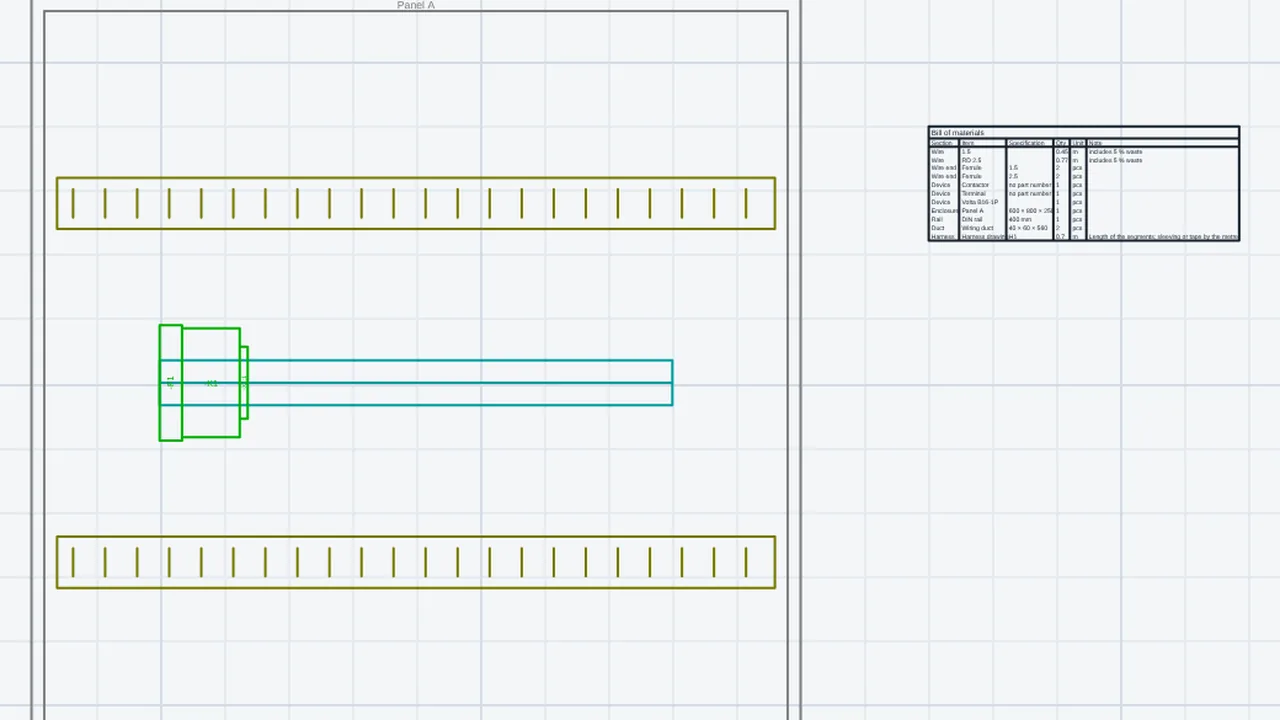
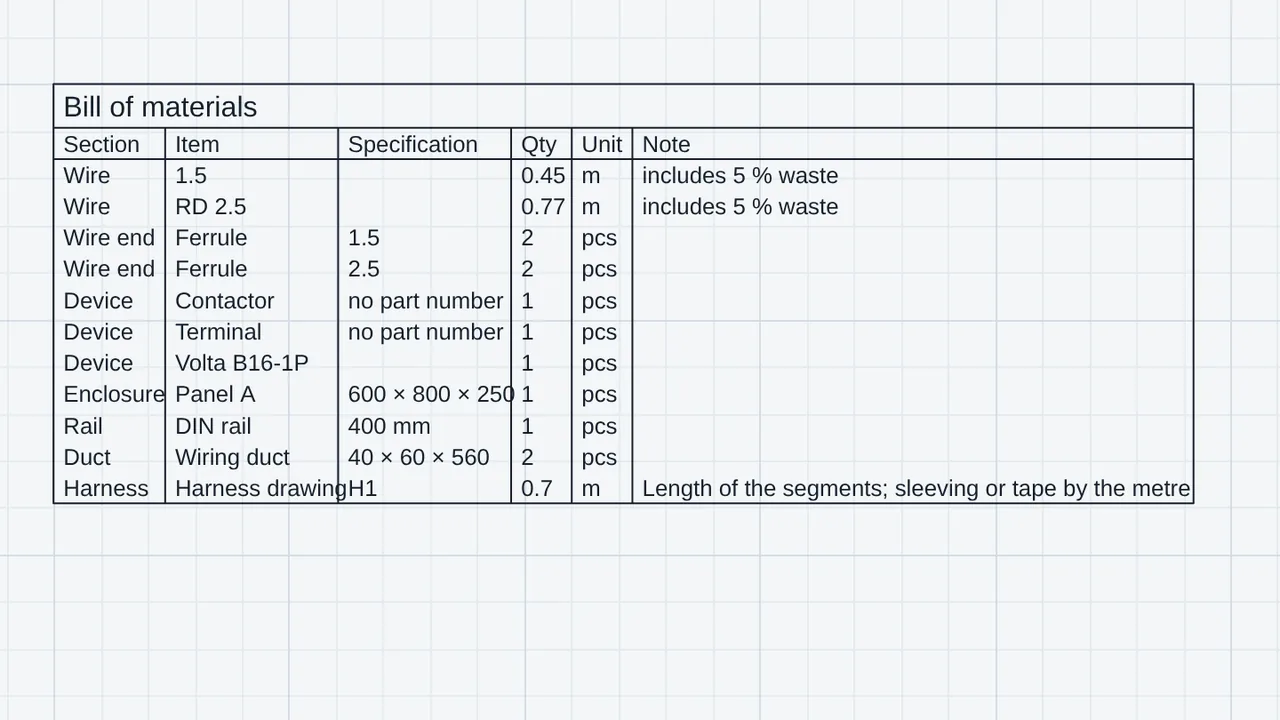
Wires and terminals for a CadCraft schematic drawn with the Electrical add-on. Each wire gets an id, colour, gauge, type and end treatment. The add-on then makes a from-to list, a wire list with cut lengths, connector tables, a harness drawing with branch points and lengths, a control-cabinet layout (back panel, DIN rails, ducts and devices on the rails) and a bill of materials. It is free and off until you switch it on.
Who it’s for
- Panel builders and wiring technicians who need the wire list, the cut lengths and the from-to list for a job.
- Control-cabinet designers who lay out the back panel, rails and ducts.
- Electrical designers who want the wiring papers to come from the schematic they drew.
What you can do
- Type HNUM to give every wire without an id the next one (W001, W002 and so on; the format is in the settings).
- Type HWIRE and select wires to set a wire's colour (IEC two-letter codes), gauge (mm2 or AWG), type, the treatment at each end, its length and a note.
- Type HFROMTO for the from-to list, HCUT for the wire list with cut lengths, HCONN for the connector tables and HBOM for the bill of materials.
- Type HHARN to draw harness nodes and segments, HEND to tie devices to a node and HROUTE to find each wire's shortest path. HROUTE adds the end allowance and the service loop, and writes the number of wires and the bundle diameter on each segment.
- Type HPANEL, HRAIL and HDUCT to draw the cabinet back panel, a DIN rail and a wiring duct. Type HMOD to put the schematic's devices on a rail.
- Export the lists as CSV, or all of them as one workbook.
- Read the checks in Problems: wires with no id, wires with no length, devices overlapping on a rail or past its end, schematic devices not yet in the cabinet, and cabinet devices the schematic does not have.
Methods and standards
Wire length: a length you type wins; otherwise the shortest path along the harness segments, plus the end allowance and the service loop set in the settings. In the cabinet, a wire's length is the distance between two device centres along the duct grid, times a slack factor you set, plus the allowances. Colour codes are the IEC 60757 two-letter codes. Bundle diameters are typical values for stranded wire.
Data and sources
The colours, gauges and module sizes are typical values, and the add-on says so. For example, a one-pole breaker is 17.5 mm wide, a contactor 45 mm and a terminal 6.2 mm; change a device's size in Properties to match the part you buy. Wire ends are a short list (ferrule, ring, fork and so on), not part numbers. Devices come from the Electrical schematic.
Verification
public_html/assets/apps/cadcraft/dev/addons/harness/test/test.mjs: 83 passed, 0 failed (the model, 33; the schematic reader checked against Electrical, 9; the add-on in CadCraft, 41). tools/addons-test/browser-wiring.mjs: 23 passed, 0 failed in Chromium, covering on and off, numbering, the schedule, CSV and workbook downloads, and saving to DWG and reopening with the add-on off. Recorded in docs/0.8-sessions/cad-addons-08.md. Hand checks in AutoCAD, TrueView or ODA have not been done yet.
Limits
Not built yet: a full-size nailboard drawing, a connector and terminal library, duct fill (the ducts are drawn and listed, but how full they are is not calculated), routing in 3D (cabinet lengths are distance times a slack factor), and cable markers from the Electrical add-on (a multi-core cable is listed as separate wires). Wire diameters and module sizes are for planning; use the figures of the parts you buy.
Files and formats
Reads the schematic from the Electrical add-on (its symbols and wire layer). Harness drawings and cabinet parts are ordinary lines and block references in the drawing, so they still show and plot with the add-on off. The wire data is kept in the drawing (DWG or DXF). Exports CSV and an XLSX workbook.
Get started
- Turn it on in Settings › General › Add-ons › Harness and cabinet wiring. It needs a schematic drawn with the Electrical add-on.
- Type HNUM, then HWIRE, to set each wire's colour, gauge and ends.
- Type HFROMTO, HCUT or HBOM to print the lists, and use Export for CSV or a workbook.
Languages
The text is available in:
- Afrikaans (af)
- Amharic (am)
- Arabic (ar)
- Azerbaijani (az)
- Belarusian (be)
- Bulgarian (bg)
- Bengali (bn)
- Bosnian (bs)
- Catalan (ca)
- Czech (cs)
- Danish (da)
- German (de)
- Dhivehi (dv)
- Greek (el)
- English (en)
- Spanish (Spain) (es-ES)
- Spanish (Mexico) (es-MX)
- Estonian (et)
- Persian (fa)
- Finnish (fi)
- Filipino (fil)
- French (fr)
- Galician (gl)
- Guarani (gn)
- Hebrew (he)
- Hindi (hi)
- Croatian (hr)
- Hungarian (hu)
- Armenian (hy)
- Indonesian (id)
- Icelandic (is)
- Italian (it)
- Japanese (ja)
- Georgian (ka)
- Kazakh (kk)
- Khmer (km)
- Korean (ko)
- Kyrgyz (ky)
- Lao (lo)
- Lithuanian (lt)
Works in
| Edition | Works | Note |
|---|---|---|
| Browser (/use) (yours) | Added on demand | Fetched the first time you use it, then kept for offline use. |
| Studio from getcadcraft.com | Added on demand | Fetched the first time you use it, then kept for offline use. |
| Microsoft Store | Added on demand | Fetched the first time you use it, then kept for offline use. |
| Google Play | Added on demand | Fetched the first time you use it, then kept for offline use. |
| iPad and iPhone (App Store) | Included; switch it on | Part of the reviewed app; your list switches it on. |
| Custom build | Added on demand | Fetched the first time you use it, then kept for offline use. |
Comes with
- Schematics and connectivity 800 KB
Adding it brings these too. Engines are shared: each downloads once for every add-on that uses it.
Needed by: Automotive and EV engineering, Electrical controls and automation (schematics, PLC panels).
Permissions
- Adds commands
- Adds toolbar buttons and menu items
- Adds a panel section
- Adds settings
- Adds its own objects and data to drawings
- Opens or saves its own file types
- Uses "problems"
From its manifest. Shown again when an update changes them, and the update waits for your yes.
Versions
| Version | Channel | Date | What changed |
|---|---|---|---|
| 0.9.0 | stable | November 9, 2026 | Signed and published. |
Licence and maker
CadCraft (CadCraft, first-party). Licence: Apache-2.0. Dependencies carry their own licences, listed on their pages.