Feature
Hazard playback
Earthquake, wind and flood on the model.
Use this add-on:
Overview
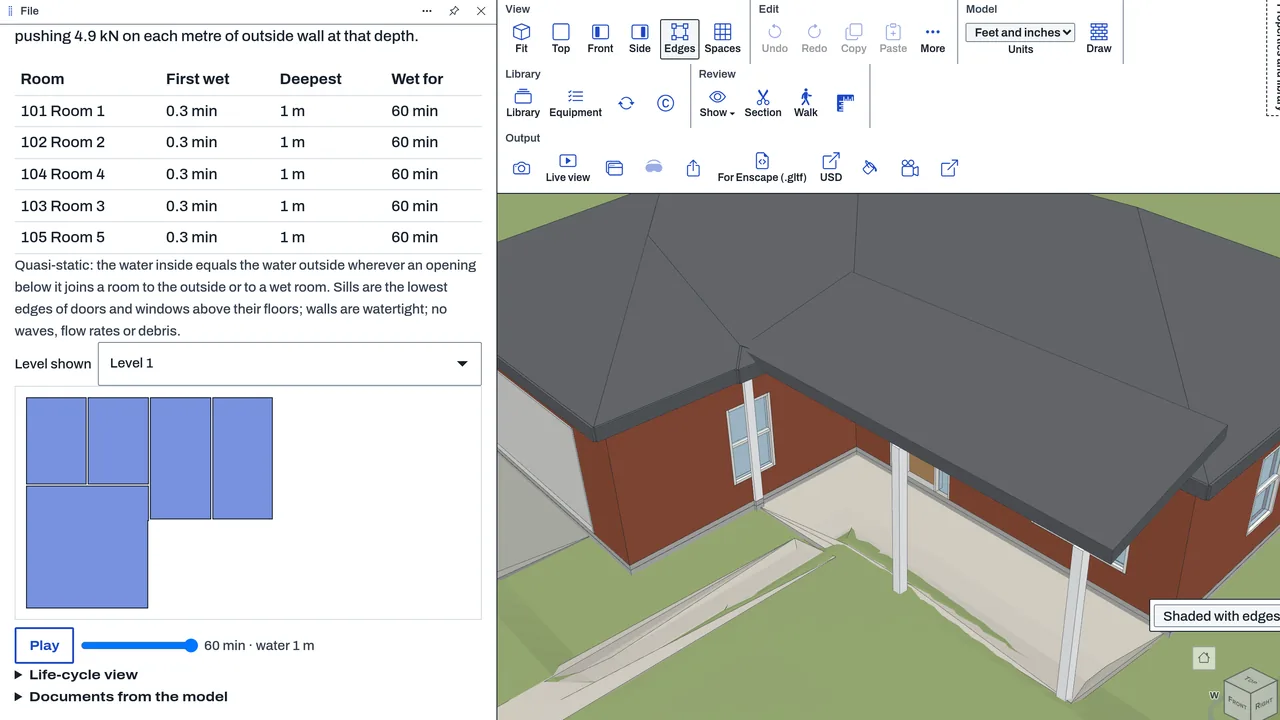
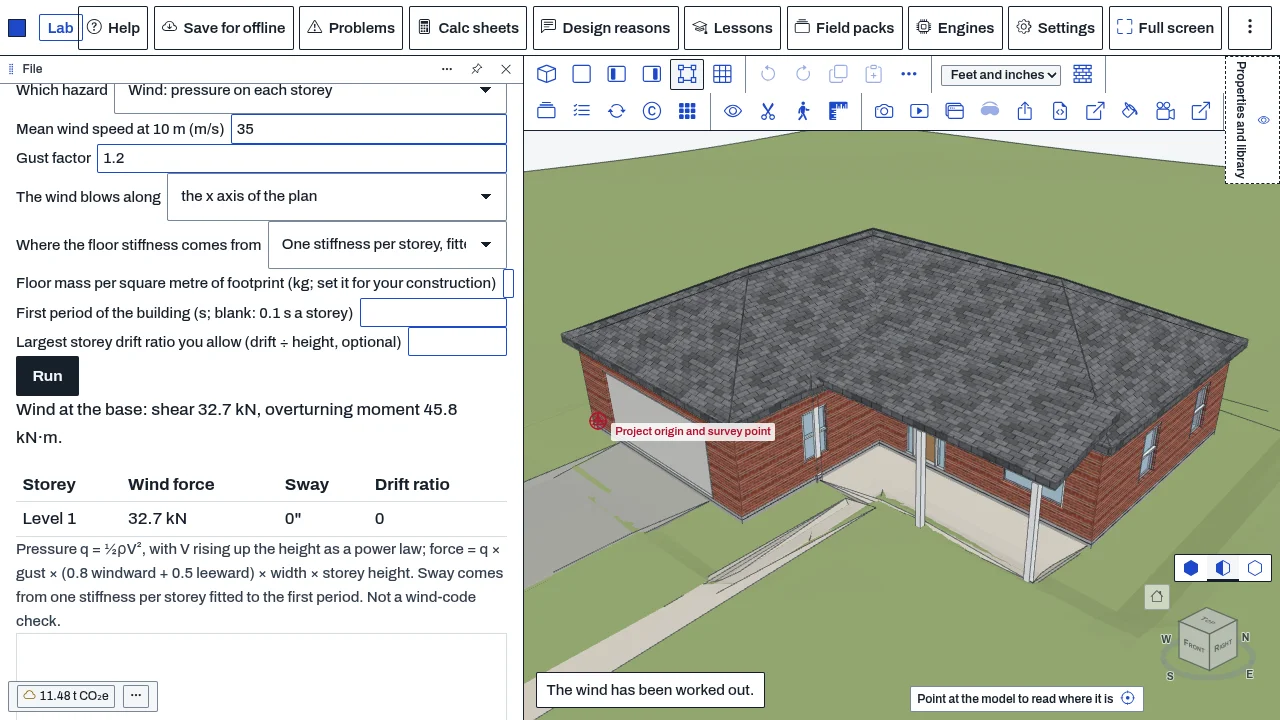
Hazard playback runs three simple models on a BimCraft model. A flood rises through the rooms and enters through openings below the water. Wind pressure acts on each storey. An earthquake shakes the storeys. Each run plays on the plan or an elevation with a time slider, and reports which rooms are wet and how deep, the wind force and moments on each storey, or the storey drift and floor accelerations. The panel states each model's assumptions. The add-on does not check the building against a code, and it does not change the model.
Who it’s for
- Structural engineers doing early studies of how a building responds to wind or earthquake motion.
- Flood-risk and site engineers who want to see which rooms take water, when and how deep.
- Fire-safety and facilities planners who want to show the effect of a flood on the plan.
What you can do
- Play a flood (Which hazard: Flood). Set the peak water level above the lowest floor, the minutes to rise, hold and fall, and your limit for water in a room. The run shows the first wet time and the deepest water for each room.
- Load your own climate scenario for a flood (Climate futures, Scenario file). The file gives a year, a sea level rise in metres and a flood factor, from a source you trust.
- Play wind (Which hazard: Wind). Set the mean speed at 10 m, the gust factor and the direction the wind blows along. Read the force, shear and overturning moment on each storey.
- Shake the storeys with an earthquake (Which hazard: Earthquake). Use a single pulse, filtered noise, or your own record. Set the peak ground acceleration, the first period, the damping, the floor mass and your drift limit. Read the base shear, the top movement, the drift and the floor accelerations.
- Take each storey's stiffness from the Analysis tab's frame (Where the floor stiffness comes from: the Analysis frame), instead of a period you type.
Methods and standards
Flood: a quasi-static water level. A room is wet to the water level minus its floor, and the hydrostatic push on a wall is ½ρgd² per metre of wall. Wind: mean speed rises with height by a power law, the pressure is ½ρV², and the force on a storey comes from a gust factor and pressure coefficients (defaults 0.8 windward and 0.5 leeward, the textbook values for a flat-faced block, which you can change). Earthquake: a shear building with one mass per floor and one stiffness per storey, Rayleigh damping, and Newmark average-acceleration time stepping. No design code is applied.
Data and sources
No ground motion record and no climate data are shipped. Ground motion is a pulse or noise made at the peak you set, or your own record. The flood levels, the floor mass per square metre and the first period are yours to set. The climate scenario is a file you bring.
Verification
tools/bimcraft-test/hazard-test.mjs runs with node bin/test-bimcraft.mjs --hazard. The flood is checked on hand-worked levels, wind against the pressure formula, and the earthquake model against closed-form answers: the eigenvalues of a shear building, the stiffness for a given period, the steady amplitude of a damped system, the decay of free vibration and base shear. The repo has no comparison against a reference structural analysis program or a measured building.
Limits
A playback aid, not a design check. The flood model is quasi-static: no flow velocity, no debris and no wave action. The wind and earthquake models are elastic, with no yielding and no torsion. The mass of a frame is its members plus a typed load on each floor. Results are not a code check for wind or seismic loads and do not replace the engineer's analysis.
Files and formats
Reads the open BimCraft model: its rooms (from closed walls with doors), its levels and its Analysis frame. Reads a climate scenario file in JSON or CSV. Writes no files and does not change the model.
Get started
- Open a BimCraft model with closed walls and doors, so its rooms are found.
- Open Hazard playback in the left panel, under Room acoustics.
- Choose Flood, Wind or Earthquake, set its values, press Run, then Play to watch it on the plan.
Languages
No languages are listed for this add-on yet. Its maker may add some.
Works in
| Edition | Works | Note |
|---|---|---|
| Browser (/use) (yours) | Added on demand | Fetched the first time you use it, then kept for offline use. |
| Studio from getcadcraft.com | Added on demand | Fetched the first time you use it, then kept for offline use. |
| Microsoft Store | Added on demand | Fetched the first time you use it, then kept for offline use. |
| Google Play | Added on demand | Fetched the first time you use it, then kept for offline use. |
| iPad and iPhone (App Store) | Included; switch it on | Part of the reviewed app; your list switches it on. |
| Custom build | Added on demand | Fetched the first time you use it, then kept for offline use. |
Comes with
- Frames and FEA 1.5 MB
Adding it brings these too. Engines are shared: each downloads once for every add-on that uses it.
Needed by: Coastal and ocean engineering, Dam and hydropower engineering, Environmental engineering (air, soil remediation, permitting), Fire and life safety engineering, Oil and gas (upstream, pipelines), Security and blast-resistant design, Water resources and hydrology.
Versions
| Version | Channel | Date | What changed |
|---|---|---|---|
| 1.0.0 | stable | October 28, 2026 | First version in the Library. |
Licence and maker
CadCraft (CadCraft, first-party). Licence: Apache-2.0. Dependencies carry their own licences, listed on their pages.