Feature
HVAC
Ducts, fittings, equipment, sizing.
Use this add-on:
Overview
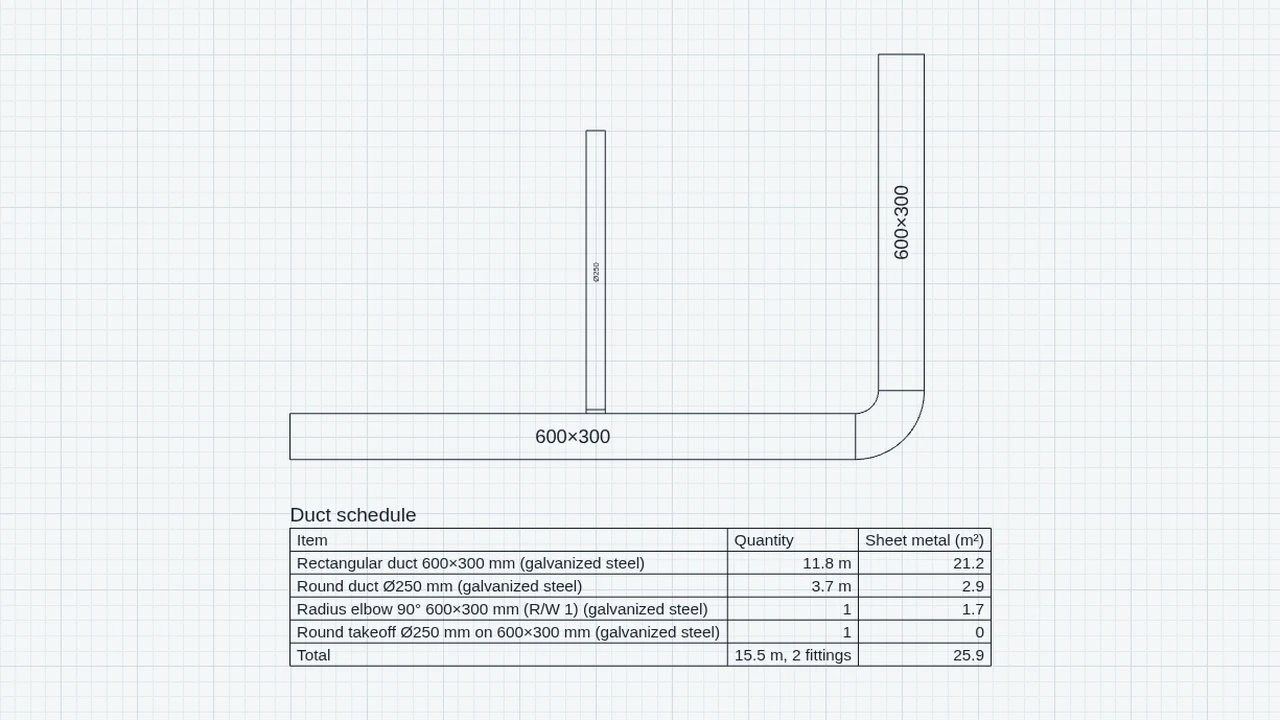
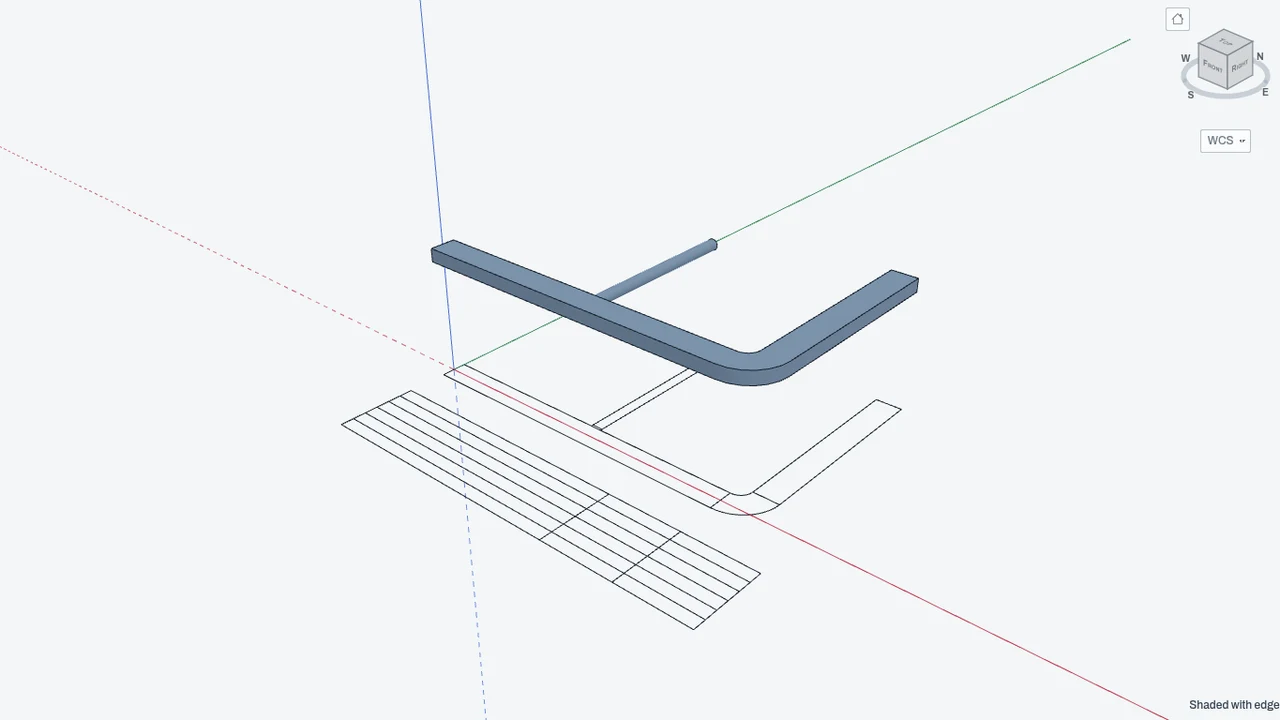
HVAC draws ductwork in CadCraft. You click the centerline of a duct run, and the add-on draws both sides with their elbows, transitions and branch fittings, sizes each section from its airflow, builds the run as a solid on the 3D tab, and lists it in a duct schedule with its sheet metal area. It is free, it comes with CadCraft, and it is off until you switch it on.
Who it’s for
- Mechanical engineers and HVAC designers who lay out duct runs and need equal-friction sizes for each section.
- Drafters who draw ductwork on plans and sections and need a schedule and sheet metal quantities.
- Estimators who take the duct quantities into TakeoffCraft.
What you can do
- Draw a duct run with DUCT. Type Z and a size such as 24x12, or A and an airflow, and the add-on picks the size. Each corner gets its own elbow. A run started inside another makes a branch.
- Size a section from its airflow and the friction rate with DUCTSIZE. Set the rate in Settings › CadCraft › HVAC. DUCTCALC lists the exact and the stocked sizes for an airflow and rate without changing the drawing.
- Check the whole drawn system with DUCTNET (DNET): the pressure lost to each free end, the critical path, the damper each other end needs, and the fan pressure, with any coil and filter pressure you type.
- Keep a duct schedule as a table in the drawing with DUCTSCHED. It updates with the runs. Export it as CSV from EXPORT › Duct schedule (CSV).
- See the ductwork on the 3D tab, tagged HVAC ductwork, and rebuild the solids with DUCT3D.
- Send the quantities to TakeoffCraft: EXPORT › Ducts for TakeoffCraft (a PDF with the takeoff inside), or EXPORT › Duct assemblies for TakeoffCraft (a pack file).
Methods and standards
Equal-friction sizing: Darcy–Weisbach friction with the Colebrook equation for standard air, as the duct design chapter of the ASHRAE Handbook, Fundamentals (2021) gives them. Rectangular ducts are converted to round equivalents by Huebscher (1948); flat oval ducts by Heyt and Diaz (1975). Duct sizes are rounded up to stocked sizes. Network fitting losses use a short list of rounded default coefficients, which the add-on labels as defaults. Sheet metal areas are worked out from perimeter and length, with the surface formulas given in the schedule help.
Data and sources
Roughness values, the stocked size steps (round ducts in 1 in steps to 10 in, then 2 in; metric 63 to 400 mm) and the default fitting coefficients are built in and stated in the help. The friction rate, material and each section's airflow are yours to set. No manufacturer's product data is included.
Verification
Sizing is checked in cadcraft/dev/addons/hvac/test/test.mjs against values worked by hand: a 1000 cfm run in a 12 in round duct moves at 1273 fpm and loses 0.189 in. w.g. per 100 ft, with the Colebrook iterations written out. The exact-size case (1000 cfm at 0.1 in. w.g. per 100 ft gives 13.66 in) is checked in t-addon.mjs. The takeoff and network parts have their own test files (t-takeoff.mjs, t-ductnet.mjs). The repo has no comparison against a reference duct network calculation or a shop's sheet metal estimate.
Limits
A sizing aid, not a design check. Sizing uses the friction rate only. Fitting losses, branch balancing and fan selection are not part of sizing. DUCTNET follows a tree of runs with default fitting coefficients and ignores stack effect, so check its results with the engineer of record. Not built yet: risers and drops, air terminals, dampers and equipment (draw them as blocks), duct gauges, reinforcement and hangers, and splitting or joining runs. Seams, laps and waste are not in the sheet metal figures.
Files and formats
Reads and writes DWG and DXF. A duct run is saved as a block reference with its data under the application name CC_HVAC, so the drawing opens in other CAD programs as ordinary duct and opens in CadCraft without the add-on with nothing lost. The 3D solids are ordinary groups that export to GLB, OBJ and STL. Writes CSV files (the duct schedule, the network) and a TakeoffCraft PDF or pack file.
Get started
- Open Settings › General › Add-ons and switch on HVAC.
- Type DUCT, then Z and a size such as 24x12. Click the points of the run and press Enter.
- Type DUCTSCHED and click where the table goes, or type DUCTNET and click the end where the fan connects.
Languages
The text is available in:
- Afrikaans (af)
- Amharic (am)
- Arabic (ar)
- Azerbaijani (az)
- Belarusian (be)
- Bulgarian (bg)
- Bengali (bn)
- Bosnian (bs)
- Catalan (ca)
- Czech (cs)
- Danish (da)
- German (de)
- Dhivehi (dv)
- Greek (el)
- English (en)
- Spanish (Spain) (es-ES)
- Spanish (Mexico) (es-MX)
- Estonian (et)
- Persian (fa)
- Finnish (fi)
- Filipino (fil)
- French (fr)
- Galician (gl)
- Guarani (gn)
- Hebrew (he)
- Hindi (hi)
- Croatian (hr)
- Hungarian (hu)
- Armenian (hy)
- Indonesian (id)
- Icelandic (is)
- Italian (it)
- Japanese (ja)
- Georgian (ka)
- Kazakh (kk)
- Khmer (km)
- Korean (ko)
- Kyrgyz (ky)
- Lao (lo)
- Lithuanian (lt)
Works in
| Edition | Works | Note |
|---|---|---|
| Browser (/use) (yours) | Added on demand | Fetched the first time you use it, then kept for offline use. |
| Studio from getcadcraft.com | Added on demand | Fetched the first time you use it, then kept for offline use. |
| Microsoft Store | Added on demand | Fetched the first time you use it, then kept for offline use. |
| Google Play | Added on demand | Fetched the first time you use it, then kept for offline use. |
| iPad and iPhone (App Store) | Included; switch it on | Part of the reviewed app; your list switches it on. |
| Custom build | Added on demand | Fetched the first time you use it, then kept for offline use. |
Comes with
- Networks engine 700 KB
Adding it brings these too. Engines are shared: each downloads once for every add-on that uses it.
Needed by: Clinical and hospital engineering, Data center and mission-critical facilities, Laboratory and cleanroom design, Mechanical (HVAC) engineering, Pharmaceutical and bioprocess engineering.
Permissions
- Adds commands
- Adds toolbar buttons and menu items
- Adds a panel section
- Adds settings
- Adds its own objects and data to drawings
- Opens or saves its own file types
From its manifest. Shown again when an update changes them, and the update waits for your yes.
Versions
| Version | Channel | Date | What changed |
|---|---|---|---|
| 0.9.0 | stable | November 8, 2026 | Signed and published. |
| 0.8.0 | stable | November 7, 2026 | Signed and published. |
Licence and maker
CadCraft (CadCraft, first-party). Licence: Apache-2.0. Dependencies carry their own licences, listed on their pages.