Feature
Landscape
Plants, grading, hardscape, irrigation aid.
Use this add-on:
Overview
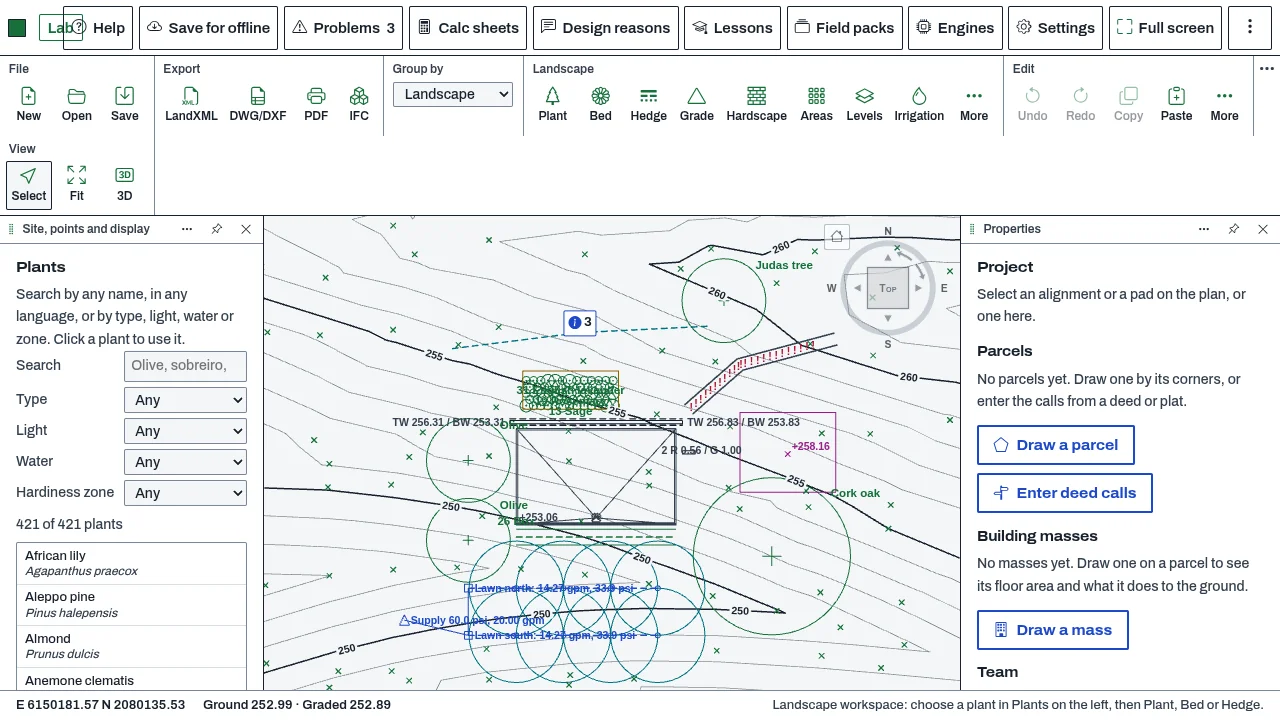
Landscape is CivilCraft's workspace for planting, grading, hardscape and irrigation on the same site as the civil work. You place plants and planting beds from a list of about 420 common temperate and Mediterranean plants, grade platforms, berms and swales, pave and wall the ground, lay out irrigation, and make the planting, grading and irrigation plans and a details sheet as one PDF. Today it is a workspace in CivilCraft. Moving it out as its own add-on is proposed.
Who it’s for
- Landscape architects and garden designers who plan planting, paving, walls, steps and irrigation on a site.
- Civil engineers who grade a terrace, a pad or a swale and check its slopes.
- Estimators who count plants and hardscape for a quantity takeoff.
What you can do
- Place single plants, fill planting beds at their spacing with mixed plants by percentage, and draw hedges, from the Plants list in the Landscape workspace.
- Count the plants by species and size in a plant schedule (More › Plant schedule…), saved as CSV, XLSX or a quantities file for TakeoffCraft. Save the plants and hardscape as IFC.
- Grade platforms, berms, swales and free grading areas with spot elevations and contours. Colour the surface by slope against a limit you set, and show which way water runs and where it would pond.
- Pave an area with falls to a drain or a cross-fall, draw paths that follow the ground, and build retaining and freestanding walls, kerbs, ramps and steps, with their checks against the limits you set.
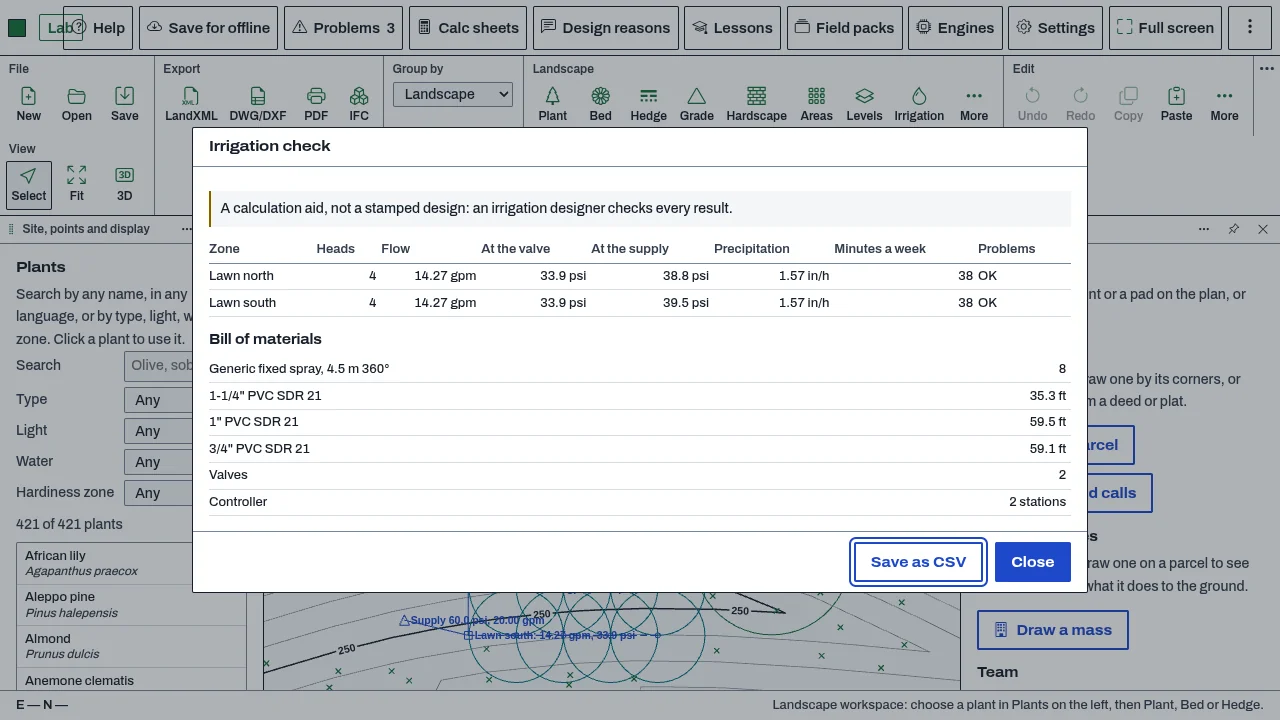
- Lay out irrigation: heads, laterals, mainline, valves and drip lines. Zones are found from the pipes; pressure loss is by Hazen–Williams, with the worst-case head, run times and a bill of materials.
- Make the planting, grading or irrigation plan and a details sheet as one PDF (More › Landscape sheets… › Make the PDF).
- Place a mesh made elsewhere (STL or OBJ) as a freeform object that sits on or cuts into the ground.
Methods and standards
Pressure loss in irrigation pipe by Hazen–Williams, with the test checked against published worked examples. Slopes, paths and ramps are checked against the limits the person types. Ponding is found by a priority-flood method on the grading surface. Quantities are counted from the drawn items.
Data and sources
A seed list of about 420 common temperate and Mediterranean plants, with sizes, hardiness, light and water needs, in the plant list. You can search it in any language, add your own plants, and save your own list with the project. Lists can be exported and imported as CSV. Check the plant data against your region and climate.
Verification
bin/test-landscape.mjs runs the workspace's checks in Node: the plant list, planting, grading, hardscape, irrigation, sheets, the workspace agent and freeform meshes. The Hazen–Williams calculation is checked against published worked examples in its irrigation section. The repo has no comparison of grading or ponding results against a reference survey or program.
Limits
A design aid, not a stamped design. Irrigation is a calculation aid, and a stamped irrigation design is the engineer's. Plant heights, spread and hardiness are for planning. Grading gives slopes and ponding on the surface you draw; it does not model drainage networks. Plants show in 3D as simple forms sized from the plant list, with no detailed plant models. Freeform objects and irrigation are not drawn in the 3D view. A concave freeform object is graded by its convex hull.
Files and formats
The landscape is saved with the CivilCraft project. It uses the layers L-PLNT-, L-GRAD-, L-HARD- and L-IRRG-. Writes the plant schedule as CSV, XLSX or a quantities file, the plants and hardscape as IFC, the sheets as PDF, and plant lists as CSV. Reads plant lists as CSV and freeform meshes as STL or OBJ.
Get started
- Open the sample site from the start panel, then Surface › More › Landscape workspace.
- Choose Hardscape › Paving, click four corners and press Enter. In Properties set Falls to To a drain.
- Place plants from the Plants list, then use More › Landscape sheets… and Make the PDF.
Languages
No languages are listed for this add-on yet. Its maker may add some.
Works in
| Edition | Works | Note |
|---|---|---|
| Browser (/use) (yours) | Added on demand | Fetched the first time you use it, then kept for offline use. |
| Studio from getcadcraft.com | Added on demand | Fetched the first time you use it, then kept for offline use. |
| Microsoft Store | Added on demand | Fetched the first time you use it, then kept for offline use. |
| Google Play | Added on demand | Fetched the first time you use it, then kept for offline use. |
| iPad and iPhone (App Store) | Included; switch it on | Part of the reviewed app; your list switches it on. |
| Custom build | Added on demand | Fetched the first time you use it, then kept for offline use. |
Comes with
Nothing else.
Needed by: Agricultural and irrigation engineering, Landscape architecture, Plant database.
Versions
| Version | Channel | Date | What changed |
|---|---|---|---|
| 1.0.0 | stable | October 28, 2026 | First version in the Library. |
Licence and maker
CadCraft (CadCraft, first-party). Licence: Apache-2.0. Dependencies carry their own licences, listed on their pages.