Layout
Workspace layouts
Use this add-on:
Overview
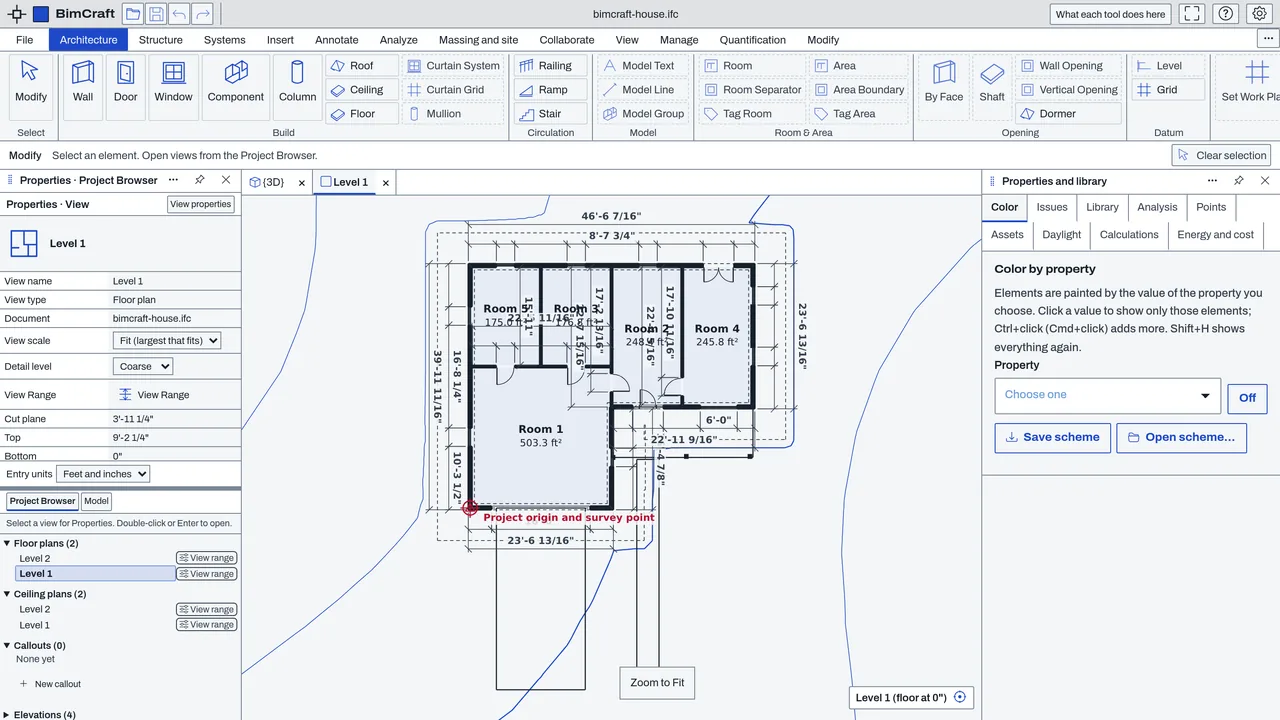
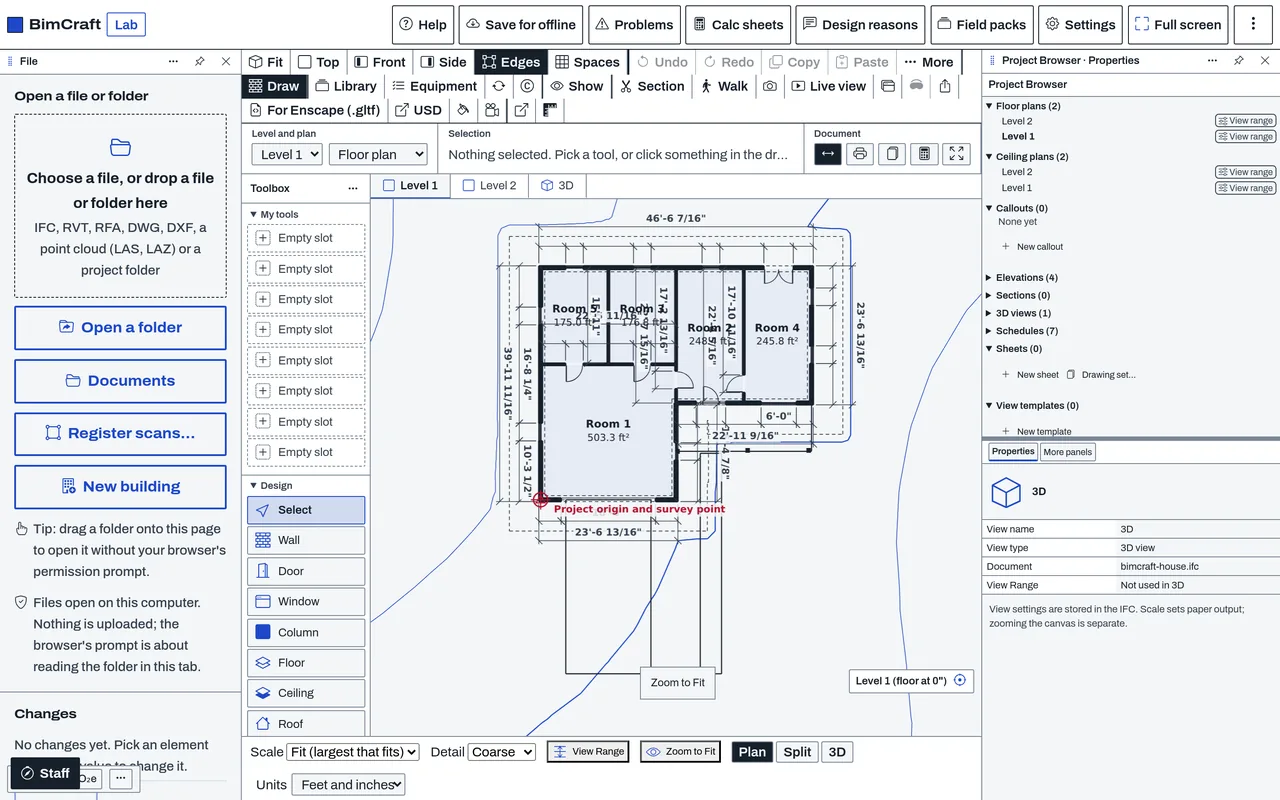
Workspace layouts set where each part of an app sits: the ribbon or toolbar, the project browser, the properties, the views and the status bar. Each app ships built-in layouts, and a person can pick one, arrange their own, or open a layout file from someone else. A layout moves the app's own blocks. It does not change the commands, the drawing or the files.
Who it’s for
- Anyone who wants an app to open with the tools they use most within reach: pick a built-in layout.
- People who want their own arrangement: build one with the arrange dialog and keep it as a file.
- Contributors who make a layout for other people: the format is public, and a layout is checked before an app uses it.
What you can do
- Pick a built-in layout in the app's Settings, in the Workspace group. The three built-in layouts are Docked (ribbon and project browser over the drawing, with a tab for each view), Toolbox (the toolbar across the top, an info box, and a column of tools with your own slots), and a ribbon layout with a quick-access title bar and view tabs.
- Arrange your own layout with Arrange your own layout…. It starts from the layout in use and offers only the blocks the app can fill. The result is a layout file.
- Use My tools in the toolbox layout: eight slots for the tools and commands you pick.
- Put a block, such as the project browser or the tool options, in a window of its own, and dock it back.
Data and sources
The built-in layouts ship with the apps (in assets/workspaces). Other layouts come from add-ons or from files a person opens. The format and a contributor guide are in the public add-ons repository.
Verification
bin/test-app-workspaces.mjs runs one conformance test for every app's built-in layouts and for any layout file, against the same contract. bin/test-workspace-arrange.mjs covers the arrange dialog. The repo has no visual check of every layout in every app.
Limits
A layout moves blocks; it adds no tools and changes no command. Not every block is available in every app, and the arrange dialog offers only those an app can fill. A layout file is read as untrusted data and refused when it does not match the format.
Files and formats
Reads and writes layout files in the cadcraft-workspace format, version 1 (.ccworkspace.json). A layout does not change the drawing or model file.
Get started
- Open the app's Settings and find the Workspace group.
- Pick one of the built-in layouts. The app rearranges at once.
- To make your own, choose Arrange your own layout… and save it.
Languages
No languages are listed for this add-on yet. Its maker may add some.
Works in
| Edition | Works | Note |
|---|---|---|
| Browser (/use) (yours) | Added on demand | Fetched the first time you use it, then kept for offline use. |
| Studio from getcadcraft.com | Added on demand | Fetched the first time you use it, then kept for offline use. |
| Microsoft Store | Added on demand | Fetched the first time you use it, then kept for offline use. |
| Google Play | Added on demand | Fetched the first time you use it, then kept for offline use. |
| iPad and iPhone (App Store) | Added on demand | Fetched the first time you use it, then kept for offline use. |
| Custom build | Added on demand | Fetched the first time you use it, then kept for offline use. |
Comes with
Nothing else.
Needed by: Acoustical engineering, Additive manufacturing engineering, Aerospace (aircraft), Agricultural and irrigation engineering, Architecture, Astronautics and space systems, Automotive and EV engineering, Autonomous systems and drones, Battery and electrochemical engineering, Biomechanical engineering (implants, prosthetics), Biomedical and medical device engineering, Building envelope and façade engineering, Chemical and process engineering, Civil and site engineering, Clinical and hospital engineering, Coastal and ocean engineering, Construction engineering and management, Dam and hydropower engineering, Data center and mission-critical facilities, Electrical (building) engineering, Electrical controls and automation (schematics, PLC panels), Electronics and PCB design, Energy and building performance modeling, Entertainment engineering (stages, rides, rigging), Environmental engineering (air, soil remediation, permitting), Exhibit and event design, Facilities and maintenance engineering, Fire and life safety engineering, Food and beverage process engineering, Forensic engineering (failure investigation), Fusion and plasma engineering, Geological and petroleum reservoir engineering, Geotechnical engineering, Hydrogen and emerging fuels, Industrial engineering (factory layout, workflow, ergonomics), Instrumentation and control engineering, Interior design and millwork, Laboratory and cleanroom design, Landscape architecture, Lighting design, Manufacturing and production engineering (CAM, sheet metal), Materials science and engineering, Mechanical (HVAC) engineering, Mechanical design (parts and assemblies), Mining engineering, Naval architecture and marine engineering, Nuclear engineering, Oil and gas (upstream, pipelines), Optical and photonics engineering, Packaging engineering, Petroleum and refining engineering, Pharmaceutical and bioprocess engineering, Piping and plant design, Plumbing and fire protection, Power systems and utility engineering, Process safety engineering, Quality and metrology (inspection, CMM, GD&T), Quantum engineering, Rail engineering, Reliability and safety engineering, Renewable energy (solar, wind, storage), RF, antenna and microwave engineering, Robotics and mechatronics, Security and blast-resistant design, Semiconductor and chip design, Structural engineering, Surveying and geomatics, Systems engineering (requirements, traceability), Telecommunications and fiber networks, Tooling, mold and die design, Transportation and traffic engineering, Tunnel and underground engineering, Wastewater and water treatment, Water resources and hydrology.
Versions
| Version | Channel | Date | What changed |
|---|---|---|---|
| 1.0.0 | stable | October 28, 2026 | First version in the Library. |
Licence and maker
CadCraft (CadCraft, first-party). Licence: Apache-2.0. Dependencies carry their own licences, listed on their pages.