Feature
Lighting plots
Entertainment lighting plots and paperwork.
Use this add-on:
Overview
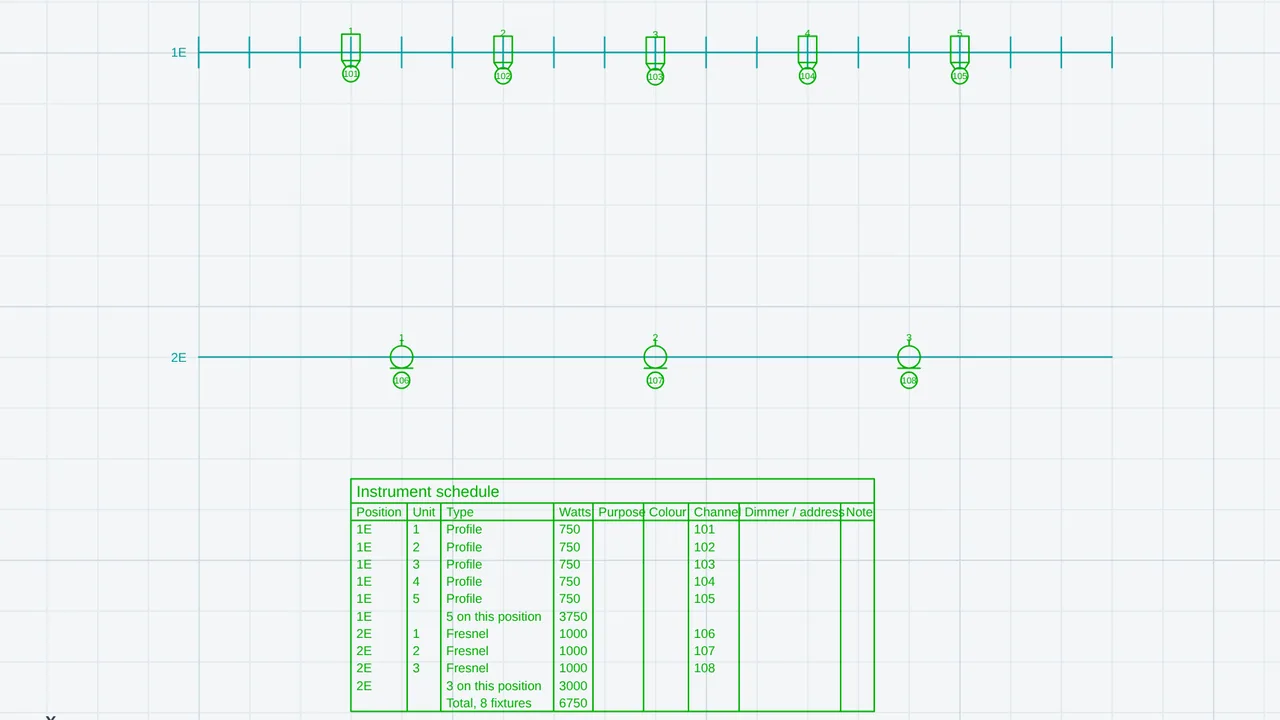
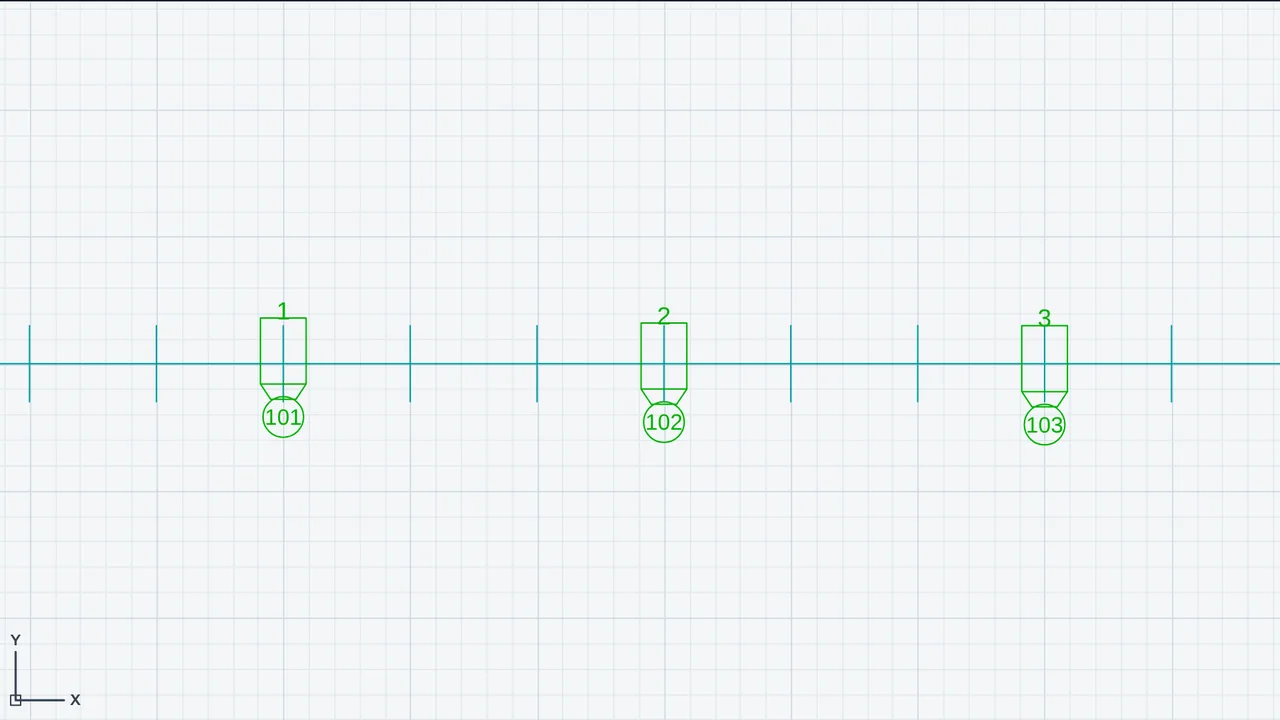
Lighting plots lays out entertainment lighting in CadCraft. You draw the positions fixtures hang on (pipes, trusses, booms and floor lines), hang the fixtures, number the units, and set channels and DMX addresses. The add-on prints the instrument schedule, the channel hookup and a legend, and warns about duplicate unit numbers, overlapping DMX addresses and overloaded dimmers. A separate pair of tools works out the direct light on a floor area from each fixture's photometry file.
Who it’s for
- Lighting designers for theatre, concerts and events who need a plot, an instrument schedule and a hookup.
- Electricians and crew who work from the schedule, the channel hookup and the legend.
- Lighting designers who want the direct illuminance on a floor from the fixtures' photometry files.
What you can do
- Draw a position with LPOS: give it a name such as 1E, choose its kind (Pipe, Truss, Boom or Floor line), click its points and press Enter.
- Hang fixtures with LFIX. Type S (Spread) to space a number of fixtures evenly along a position.
- Number the units along each position with LNUM. Type C first to number the channels too.
- Set a selection's purpose, colour, channel, address, wattage or note with LSET. The entry 101+ numbers a selection in a row from 101.
- Draw the instrument schedule (LSCHED) and the channel hookup (LHOOK) as tables in the drawing, and the legend with LLEGEND.
- Export the schedule or the hookup as CSV, or both, with the dimmer loads, as one workbook, from EXPORT.
- Hide or recolour all lights, or all positions, at once with CLASSES. Fixtures are in classes Lighting-Fixtures-… and positions in Rigging-….
- Load a photometry file (.ies or .ldt) for each fixture type with LPHOTO (LPH). Then LLUX (LUX) gives the illuminance at the points of an area: the lowest, average and highest values, the uniformity, the lumens and watts over the area, and the watts per square metre, written on layer LX-LUX.
Methods and standards
Direct illuminance from each fixture's luminous intensity by the inverse-square cosine law, E = I(γ, C) · cos θ / d², worked out point by point. Photometry files are read from the IES LM-63 (1991, 1995 and 2002) and EULUMDAT (.ldt) text layouts. The result is direct light only: no reflection from walls or ceilings and no blocking by set pieces. Target levels for lux and uniformity are typed by the person.
Data and sources
Fixture types are generic kinds of instrument with typical wattages and DMX footprints (24 addresses for a moving head and 8 for an LED wash unless you change them). These are typical figures, not a maker's. Set each fixture's own wattage and footprint. Photometry files come from the maker and are kept in this browser.
Verification
The photometry calculation is checked in tools/bimcraft-test/eg-mep-test.mjs (run with node bin/test-bimcraft.mjs --eg) against hand-worked cases: a 1000 lm Lambertian source 3 m above a point gives 35.37 lux straight below, and an off-axis point at 45° gives 8.84 lux. The plot's own tests are in cadcraft/dev/addons/lighting/test (t-model.mjs, t-lux.mjs and t-addon.mjs). The repo has no comparison against a measured installation or a reference lighting program.
Limits
A plot and paperwork aid. Fixtures are drawn in plan only; there are no light cones in 3D. Fixture types are generic. The hookup lists channel, address and load but makes no patch of dimmers into circuits or racks. Lux results are direct light only: predictions, not measurements, and a lower bound for a room. Gel and gobo schedules are typed text and are not counted by stock. Section views are not drawn. Load checks use the wattages and footprints you enter.
Files and formats
Fixtures and positions are ordinary block references and lines in DWG and DXF, and each carries its data (unit, channel, purpose and the rest). With the add-on off, or in another program, they still show and plot. Writes CSV files for the schedule and the hookup, and one workbook with both and the dimmer loads. Reads IES LM-63 and EULUMDAT photometry files. LLUX writes its results on layer LX-LUX.
Get started
- Open Settings › General › Add-ons and switch on Lighting plots.
- Type LPOS, name the position (for example 1E), choose its kind, click its points and press Enter.
- Type LFIX, choose a fixture type and click where each fixture goes. Then type LNUM to number the units.
Languages
The text is available in:
- Afrikaans (af)
- Amharic (am)
- Arabic (ar)
- Azerbaijani (az)
- Belarusian (be)
- Bulgarian (bg)
- Bengali (bn)
- Bosnian (bs)
- Catalan (ca)
- Czech (cs)
- Danish (da)
- German (de)
- Dhivehi (dv)
- Greek (el)
- English (en)
- Spanish (Spain) (es-ES)
- Spanish (Mexico) (es-MX)
- Estonian (et)
- Persian (fa)
- Finnish (fi)
- Filipino (fil)
- French (fr)
- Galician (gl)
- Guarani (gn)
- Hebrew (he)
- Hindi (hi)
- Croatian (hr)
- Hungarian (hu)
- Armenian (hy)
- Indonesian (id)
- Icelandic (is)
- Italian (it)
- Japanese (ja)
- Georgian (ka)
- Kazakh (kk)
- Khmer (km)
- Korean (ko)
- Kyrgyz (ky)
- Lao (lo)
- Lithuanian (lt)
Works in
| Edition | Works | Note |
|---|---|---|
| Browser (/use) (yours) | Added on demand | Fetched the first time you use it, then kept for offline use. |
| Studio from getcadcraft.com | Added on demand | Fetched the first time you use it, then kept for offline use. |
| Microsoft Store | Added on demand | Fetched the first time you use it, then kept for offline use. |
| Google Play | Added on demand | Fetched the first time you use it, then kept for offline use. |
| iPad and iPhone (App Store) | Included; switch it on | Part of the reviewed app; your list switches it on. |
| Custom build | Added on demand | Fetched the first time you use it, then kept for offline use. |
Comes with
Nothing else.
Needed by: Electrical (building) engineering, Entertainment engineering (stages, rides, rigging), Exhibit and event design, Lighting design.
Permissions
- Adds commands
- Adds toolbar buttons and menu items
- Adds a panel section
- Adds settings
- Adds its own objects and data to drawings
- Opens or saves its own file types
- Uses "problems"
From its manifest. Shown again when an update changes them, and the update waits for your yes.
Versions
| Version | Channel | Date | What changed |
|---|---|---|---|
| 0.9.0 | stable | November 9, 2026 | Signed and published. |
Licence and maker
CadCraft (CadCraft, first-party). Licence: Apache-2.0. Dependencies carry their own licences, listed on their pages.