Feature
Power lines
Line design, sag and tension, stringing.
Use this add-on:
Overview
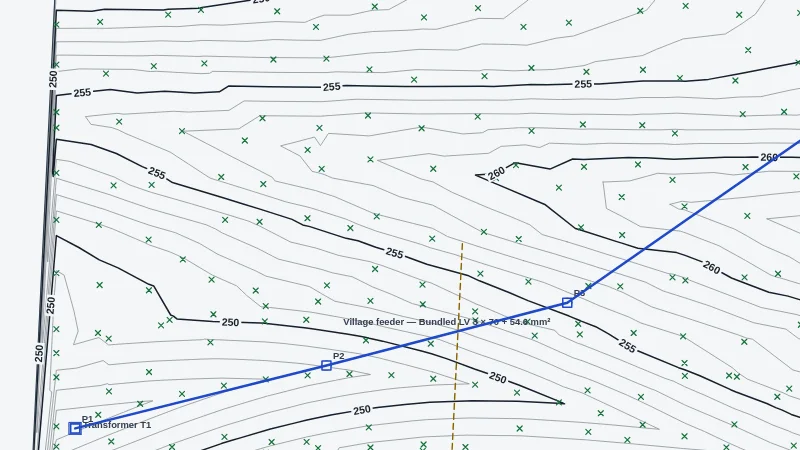
Power lines designs overhead lines and underground cables on a CivilCraft site. You place the supports of an overhead line and the routes of cables, then the workspace works out sag and tension under your own load cases, and checks clearances, phase spacing, insulator swing, support loads and sizing, fittings, foundations, data, and voltage drop and current. It produces stringing tables, support lists, quantities, plan and profile sheets, a study report and GIS exports. The workspace uses the site's own survey points, ground and project file. No country's standard is built in: you enter the rules and the library that apply.
Who it’s for
- Overhead line and distribution designers: sag, tension and clearance of their own lines under their own load cases.
- Utility and network engineers: a library of their own conductors, cables, supports and equipment, saved as a pack for their company.
- Designers of underground cable routes: cover over cables, crossings, joints and trench quantities.
- Estimators: stringing tables, support lists and quantities for a bid or a takeoff.
What you can do
- Open the workspace with Surface, More, Power lines workspace.
- Draw an overhead line with Line (click each support), add a Support on a span, and see the Profile of ground, supports and conductor at each load case.
- Draw underground cable routes in a trench with Cable, and cabinets, transformers, joints or the source of the network with Equipment.
- Set load cases (temperature, wind pressure and radial ice), tension limits, clearance rules and factors in More, Load cases and limits.
- Read Checks in the Power lines section. Click a check to select what it is about; failing supports and spans are ringed in red on the plan.
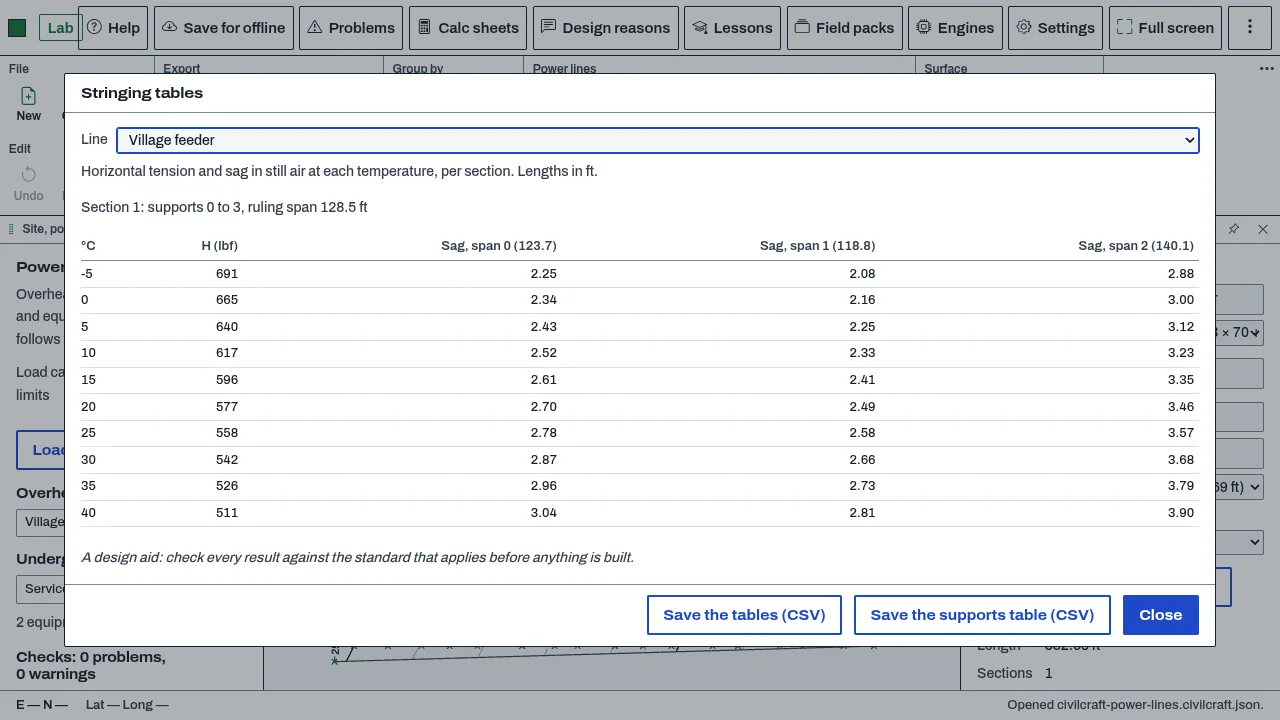
- Produce stringing tables (More, Stringing tables) and save them, and the supports table, as CSV. The start range is -5 to 40 degrees C in 5 degree steps.
- Export quantities as CSV or XLSX, or to TakeoffCraft; plan and profile sheets and a study report as one PDF; and GIS features as GeoPackage, shapefile, GeoJSON, KML or KMZ.
- Save your rule set and library together as a pack with Save as a pack, or open a pack or rules file.
Methods and standards
Sag and tension: each section's ruling span is the square root of (sum of L cubed over sum of L). Each tension limit becomes a horizontal tension in the reference case through the change-of-state equation on the ruling span, and every load case follows from that one. Each span is the exact catenary through its two attachment points, with the sag, length and end tensions. Load per metre: weight plus ice vertically, and wind pressure times the iced diameter horizontally. Phase spacing needed: k times the square root of (sag plus insulator length) plus U/150, with U in kV, a common form in which k is your rule set's value. Insulator swing: atan(transverse load over vertical load). Support loads: transverse wind plus the turn, the difference of the two sides' tensions at a dead end or angle, and the vertical load. Voltage drop: the square root of 3 times I times L times (R cos phi plus X sin phi), with R at 20 degrees C.
Data and sources
No national rules are built in. Two example rule sets (cold climate and mild climate) use numbers from no standard; set the values your standard gives. Example conductors, cables, supports and trench types are generic numbers worked out from material properties, and each has to be checked against your supplier's data. You make your own library items, save them as CSV, and share them as packs. Packs others share are listed on the add-ons page under Power line packs.
Verification
The Node tests in bin/test-powerline.mjs, bin/test-powerline-net.mjs, bin/test-powerline-out.mjs and bin/test-powerline-don.mjs. Run on 2026-10-29: test.mjs 117 passed, 0 failed; net 75 passed, 0 failed; out 58 passed, 0 failed; don 77 passed, 0 failed. Known answers are worked by hand in the comments beside each check (for example the aluminium 7 by 3.0 mm conductor and a 400 V, 50 m, 50 kW cable run). Not yet checked against a reference case from a published sag and tension or clearance example.
Limits
A design aid. Results are only as good as the rule set and library you enter. No country's standard is built in. Conductor creep and the stretch of a new conductor are not counted; allow for them through the temperatures in the stringing table. A buried cable has no current rating until you enter your supplier's value. Not built yet: short-circuit, protection and earthing studies; lattice towers designed member by member, and stay anchors in the soil (supports are checked by their nominal load, stays by their rated load); the sideways distance to a tree crown or wall; power lines in the 3D view and in IFC; the assistant tools without the CivilCraft window open. The .DON study file is written and read by our own code, and its layout has not been checked with the program that reads it.
Files and formats
Saved in the CivilCraft project file, with the library kept in the project. Library files are .cclines.json; packs (rule set and library together) are .cclinepack.json. Study files are .DON (untested with the program that reads them). Writes stringing and support tables as CSV, quantities as CSV, XLSX or to TakeoffCraft, plan and profile sheets and the study report as PDF, and GIS features as GeoPackage, shapefile, GeoJSON, KML and KMZ. The line and cable drawing is on layers named C-POWR-, so DXF, DWG and PDF exports carry it.
Get started
- Open Surface, More, Power lines workspace.
- Under More, open Load cases and limits, and set your temperature, wind and ice cases, tension limits and clearance rules.
- Press Line and click each support. Open Checks and click each finding to see what it is about.
Languages
No languages are listed for this add-on yet. Its maker may add some.
Works in
| Edition | Works | Note |
|---|---|---|
| Browser (/use) (yours) | Added on demand | Fetched the first time you use it, then kept for offline use. |
| Studio from getcadcraft.com | Added on demand | Fetched the first time you use it, then kept for offline use. |
| Microsoft Store | Added on demand | Fetched the first time you use it, then kept for offline use. |
| Google Play | Added on demand | Fetched the first time you use it, then kept for offline use. |
| iPad and iPhone (App Store) | Included; switch it on | Part of the reviewed app; your list switches it on. |
| Custom build | Added on demand | Fetched the first time you use it, then kept for offline use. |
Comes with
Nothing else.
Needed by: Power systems and utility engineering.
Versions
| Version | Channel | Date | What changed |
|---|---|---|---|
| 1.0.0 | stable | October 28, 2026 | First version in the Library. |
Licence and maker
CadCraft (CadCraft, first-party). Licence: Apache-2.0. Dependencies carry their own licences, listed on their pages.