Feature
Railroads
Rail alignments, track corridors, turnouts.
Use this add-on:
Overview
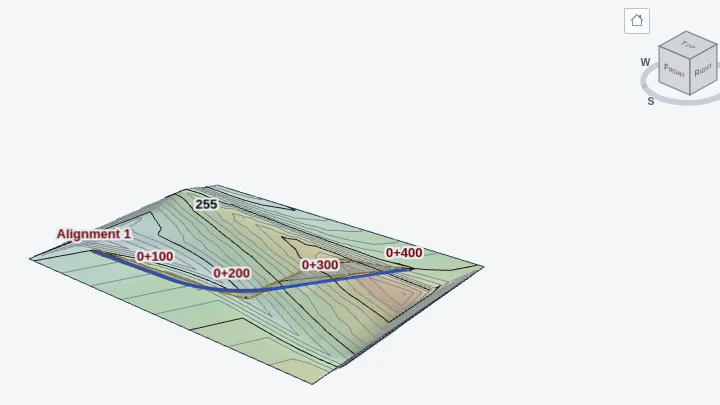
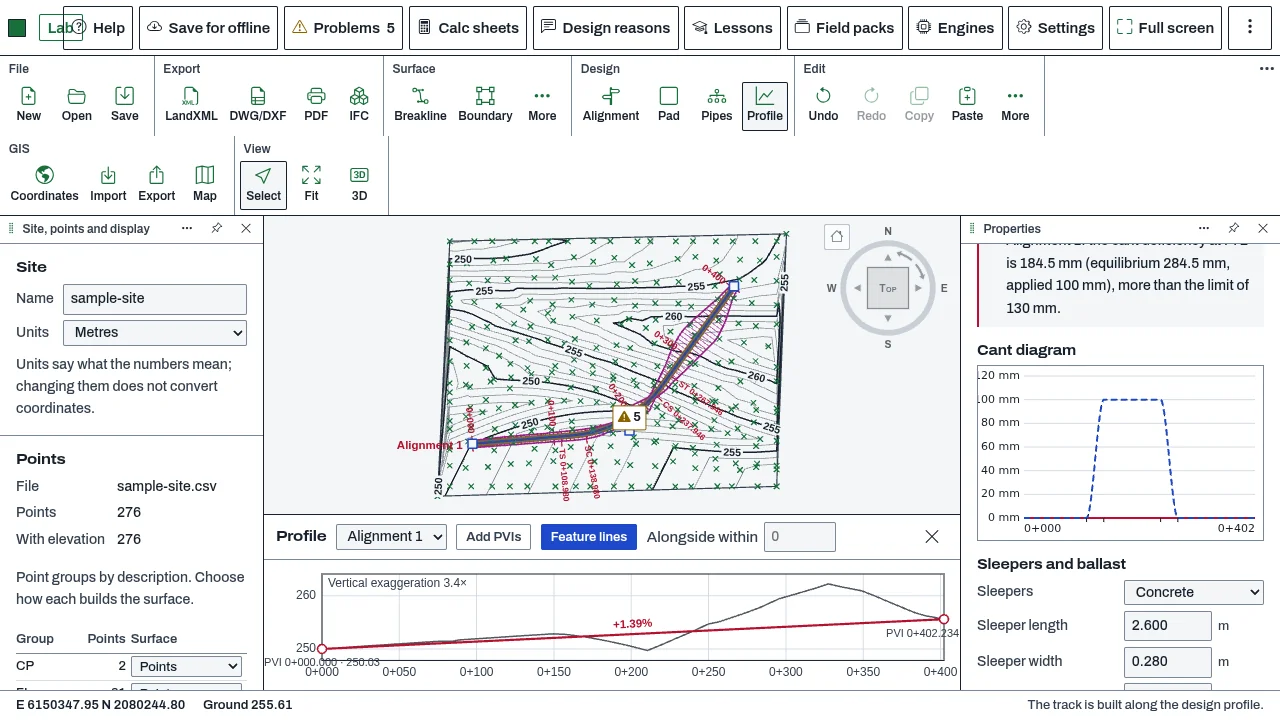
Railroads makes any CivilCraft alignment a railway track. Its curves get rail transition curves, a cant (the superelevation of the rails) with its equilibrium cant, cant deficiency and cant excess, and cant limits shown as warnings. The track is built as a corridor with rails, sleepers and a ballast bed, shown in plan, sections, profile, 3D and quantities. Turnouts, crossovers and track vertical checks are not built yet.
Who it’s for
- Railway and track designers: curves with transitions and cant, checked against the design speed and the slowest trains.
- Civil engineers laying out a track corridor: rails, sleepers and ballast in each section, and in the profile.
- Estimators: track length, rail, sleepers, ballast and sub-ballast quantities.
What you can do
- Make an alignment a railway: select it, find Railway in Properties, and tick This alignment is a railway track.
- Set the design speed (the line speed the cant is checked against) and the slowest trains' speed (for cant excess).
- Give each curve spiral lengths in and out in the PI table, then choose its transition kind in the Railway block, or use Transition for every curve. Kinds: clothoid, cubic parabola, Bloss, Helmert, sine half-wave and sine.
- Type the cant of each curve in millimetres. The table shows the equilibrium cant, the deficiency, the excess and the steepest cant ramp for each curve.
- Choose which rail stays on the design profile (Cant turns about): the low rail, the inner rail or the track centre.
- Read the Cant diagram, which draws each rail's height along the profile.
- Set the gauge (standard 1435 mm, broad, metre and narrow presets, or your own), the rail section (60E1, 54E1, 49E1, 115RE or 136RE), the number of tracks and their centres, and the sleepers and ballast. Then press Build the track.
- Read the quantities for the track: track length, rail, sleepers, ballast bed and sub-ballast.
Methods and standards
Transition curvature: clothoid grows evenly; cubic parabola y = x cubed over (6 R L); Bloss 3u squared minus 2u cubed; Helmert two parabolas, 2u squared and then 1 minus 2(1 minus u) squared; sine half-wave (1 minus cos pi u) over 2; sine u minus sin(2 pi u) over 2 pi, with u the share of the transition's length. Equilibrium cant: G times v squared over (g times R), with G the distance between the rail centres. With G = 1500 mm this is the familiar 11.8 times V squared over R (V in km/h, R in m). Deficiency is the equilibrium cant at the line speed less the applied cant; excess is the applied cant less the equilibrium cant at the slowest trains' speed. Quantities are by average end areas between sections.
Data and sources
No national table is built in. Every limit in the railway settings is a placeholder, and railways set their own limits by line speed, track type and country. Rail sections carry only the published dimensions of the listed profiles. Gauge presets are the standard, broad, metre and narrow gauges.
Verification
The Node tests in bin/test-civilcraft-rail.mjs. Run on 2026-10-29: 181 passed, 0 failed. Each transition is checked against an independent numerical integration of its own curvature definition, and against the published small-angle shifts for each form. The equilibrium cant is checked against 11.8 times V squared over R and against the AREMA imperial form. The browser test is tools/civilcraft-test/browser-rail.mjs. Not yet checked against a reference case from a built railway.
Limits
Limits are placeholders until you set them from your railway's standard. Cant limits are checked when a design speed is set; without one, deficiency and the rate of change of cant are not checked, and a note says so. Not built yet: turnouts and crossovers; clearance envelopes and structure gauges; track vertical checks (grade and vertical curve limits by speed); the cant and the track in the IFC export; overhead lines and signalling. Not a design approval.
Files and formats
Part of the CivilCraft project file: the alignment's railway settings and its track. The plan draws both rails of each track on layer C-RAIL-TRAK and each track's centre on C-RAIL-CNTR, and these carry into DXF, DWG and PDF output and the plan and profile sheets. LandXML keeps each transition kind (spiType clothoid, cubicParabola, bloss, biquadratic, cosine or sinusoid). 3D exports are GLB, OBJ and USD.
Get started
- Select the alignment and find Railway in its Properties.
- Tick This alignment is a railway track, then set the design speed and the spiral lengths for each curve.
- Set the gauge, rail section, sleepers and ballast, then press Build the track.
Languages
No languages are listed for this add-on yet. Its maker may add some.
Works in
| Edition | Works | Note |
|---|---|---|
| Browser (/use) (yours) | Added on demand | Fetched the first time you use it, then kept for offline use. |
| Studio from getcadcraft.com | Added on demand | Fetched the first time you use it, then kept for offline use. |
| Microsoft Store | Added on demand | Fetched the first time you use it, then kept for offline use. |
| Google Play | Added on demand | Fetched the first time you use it, then kept for offline use. |
| iPad and iPhone (App Store) | Included; switch it on | Part of the reviewed app; your list switches it on. |
| Custom build | Added on demand | Fetched the first time you use it, then kept for offline use. |
Comes with
Nothing else.
Needed by: Rail engineering.
Versions
| Version | Channel | Date | What changed |
|---|---|---|---|
| 1.0.0 | stable | October 28, 2026 | First version in the Library. |
Licence and maker
CadCraft (CadCraft, first-party). Licence: Apache-2.0. Dependencies carry their own licences, listed on their pages.