Feature
Solar PV
Arrays, shading, yield, strings, one-line.
Use this add-on:
Overview
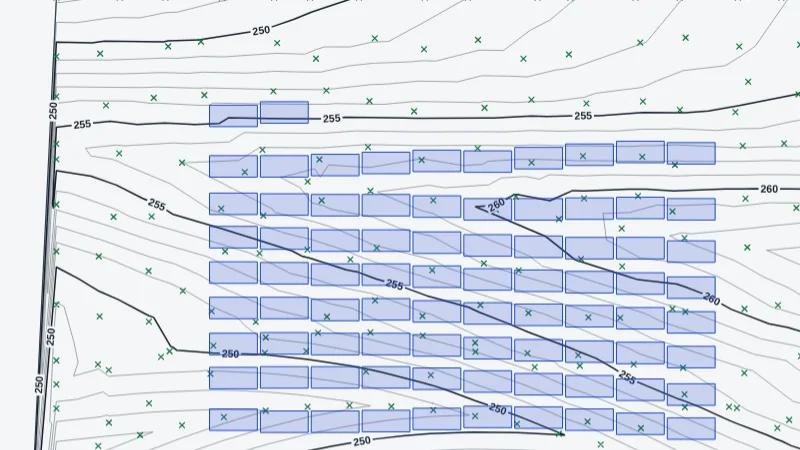
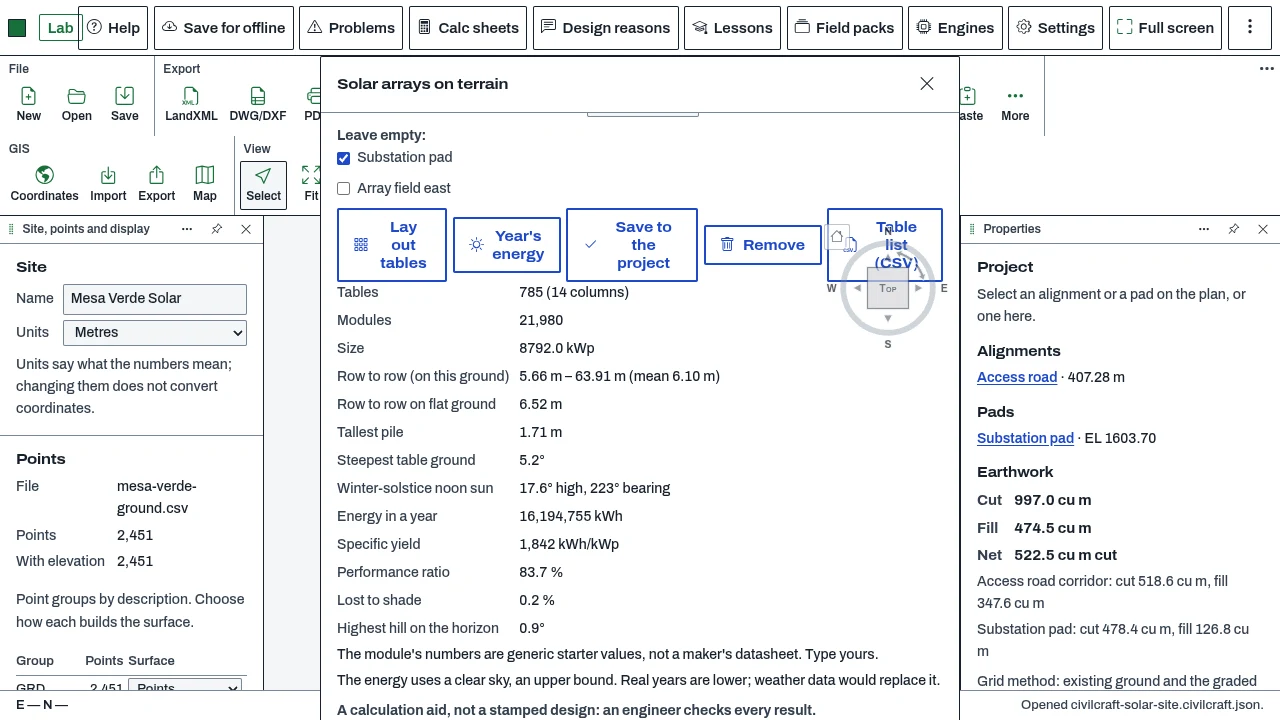
Solar PV works out ground-mounted PV arrays on the terrain: it lays out rows of tables that follow the ground, leaves steep or kept-out ground empty, works out the row spacing that avoids shading at the winter solstice, and estimates the year's energy with the hills on the horizon. It also sizes strings against an inverter and draws a PV one-line for a sheet. Today the solar tools sit in BimCraft's and CivilCraft's core; moving them into this add-on is proposed, not done.
Who it’s for
- Solar designers who want a first layout of ground arrays on a site and an early energy figure.
- Building services and electrical designers who need string sizes and a one-line for a roof or ground array.
- Site planners who need the array's footprint, pitch and size on the plan.
What you can do
- Lay out ground-mounted tables inside a parcel, a pad, or corners you type (CivilCraft, Surface, More, Solar arrays). Each table follows the ground, and the row pitch is set for the ground it stands on.
- Choose the module and the layout: modules across and up a table, portrait or landscape, the gap between tables, the lowest edge above the ground, the setback, the steepest ground and the tallest pile.
- Work out the year's energy and the specific yield, with the losses and the shading from the terrain on the horizon (Year's energy). The result is a clear-sky upper bound, not a forecast.
- Save the array to the project and export the table list as CSV.
- In BimCraft, use the Solar PV pane (Energy and cost, Solar panels) for arrays on roofs and in the model: arrays, one-line, strings and yield.
- In CadCraft, the Electrical add-on's ELPVONELINE command places the one-line that BimCraft saves from its Solar PV pane on a sheet.
Methods and standards
Sun position from NOAA's method. Clear-sky irradiance by the Hottel model, and the monthly diffuse fraction by Erbs. Plane-of-array light on the tilted module, with the incidence-angle modifier. Shade from the model's own geometry by ray tests (Moller and Trumbore's ray-triangle intersection). Module temperature by the NOCT model (Duffie and Beckman, section 23.3). String sizing checks module voltage against the inverter's window at the coldest and hottest temperatures. The sun and the module temperature are worked out with the published methods cited in the code; the safety factors are parameters that you set.
Data and sources
The module and inverter values that ship are labelled generic starter values, not a maker's datasheet. Type your module's and inverter's numbers. The monthly sky can be your own monthly mean irradiance, or the clear-sky model. Terrain comes from the project's ground surface.
Verification
Tested by bin/test-civilcraft-solar.mjs and bin/test-civilcraft-solaragent.mjs, which check the ground layout and the assistant tools over a real project. The PV engine is shared with BimCraft and is tested by tools/bimcraft-test/eg-pv-test.mjs. Not yet checked against a reference case or against the measured output of a built plant.
Limits
Yields are early-design estimates, not a bankable yield report: the clear-sky figure is an upper bound and real years are lower. Diffuse light is not shaded. A part-shaded module is counted as losing that share of its beam. The one-line is not a compliance statement: cable sizing, protection and code compliance stay with the engineer of record.
Files and formats
The arrays are saved with the CivilCraft project under the solar key. Writes the table list as CSV. In BimCraft the array is saved with the model. The one-line is drawn on the CadCraft sheet and saved with its drawing (DWG).
Get started
- Open CivilCraft over a site that has a ground surface, then Surface, More, Solar arrays.
- Pick the parcel or pad, type the latitude and longitude, and type the module's numbers.
- Press Lay out tables, then Year's energy. Save to the project.
Languages
No languages are listed for this add-on yet. Its maker may add some.
Works in
| Edition | Works | Note |
|---|---|---|
| Browser (/use) (yours) | Added on demand | Fetched the first time you use it, then kept for offline use. |
| Studio from getcadcraft.com | Added on demand | Fetched the first time you use it, then kept for offline use. |
| Microsoft Store | Added on demand | Fetched the first time you use it, then kept for offline use. |
| Google Play | Added on demand | Fetched the first time you use it, then kept for offline use. |
| iPad and iPhone (App Store) | Included; switch it on | Part of the reviewed app; your list switches it on. |
| Custom build | Added on demand | Fetched the first time you use it, then kept for offline use. |
Comes with
- Networks engine 700 KB
Adding it brings these too. Engines are shared: each downloads once for every add-on that uses it.
Needed by: Electrical (building) engineering, Energy and building performance modeling, Renewable energy (solar, wind, storage).
Versions
| Version | Channel | Date | What changed |
|---|---|---|---|
| 1.0.0 | stable | October 28, 2026 | First version in the Library. |
Licence and maker
CadCraft (CadCraft, first-party). Licence: Apache-2.0. Dependencies carry their own licences, listed on their pages.