Feature
Swept path (vehicles, aircraft, light rail)
Drive a vehicle, an aircraft or a light rail car along a path in CivilCraft and see the ground it sweeps and what it touches.
Use this add-on:
Overview
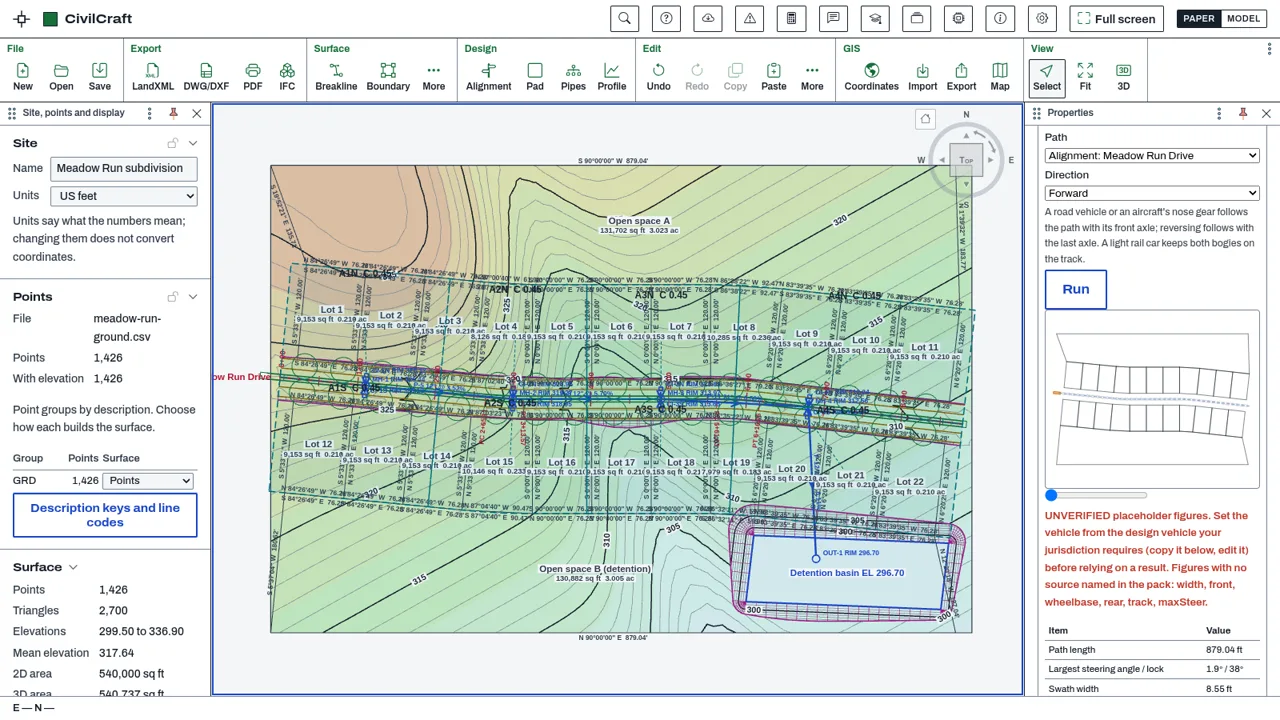
Swept path shows where a vehicle goes and what it sweeps. Pick a road vehicle, an aircraft or a light rail car, give it a path from an alignment or a line in your CivilCraft project, and see the ground its body covers, the tracks of its wheels, wing tips or bogies, and every place it comes within a margin of a kerb, a building or any other line. Conflicts go into the Problems panel, and the result is drawn into the project as ordinary lines (one undo step) and saved as a CSV report.
It also draws a roundabout from a circle, a lane and its legs and runs every entry and exit of a chosen vehicle through it, and lays out parking bays inside a closed line, counts them and checks how a vehicle pulls into the hardest bay with its neighbours occupied. It uses CivilCraft's own swept path solver for road vehicles, so a road run here is the same number you get from the Swept path button. Your project stays on your computer; nothing is sent anywhere. It is a planning aid: the engineer decides.
Who it’s for
- A civil or site engineer checking that a truck, a bus or a fire engine can turn a corner, use a driveway or get round a roundabout.
- A designer of a parking lot, depot or loading yard who needs to see where a vehicle goes and how many bays fit.
- An airport or tram planner who wants a first look at a taxi turn or a light rail curve before the specialist tools.
- A student or small consultancy who needs swept path checks without a per-seat licence.
What you can do
- Run a road vehicle, with up to three trailers, forward or reversing, along an alignment or a line, and see its envelope, wheel tracks, largest steering and articulation angle, and a warning when it needs more than its steering lock or hitch limit allows. Swept path tab, Run along a path. verified
- Run an aircraft on the ground along a taxi line: the nose gear steers, and the wing tips, tail and engine points are traced as the aircraft turns. A pushback is a reverse run. Swept path tab, Run along a path. verified
- Run a light rail car or a coupled consist along a track line and see how far the body swings off the track at the middle and at the ends. Swept path tab, Run along a path. verified
- Check a run against the kerbs, buildings, parcels and lines you tick, with a margin: each conflict lists where along the path it first happens, and goes to Problems. Swept path tab, Clearance. verified
- Draw a roundabout and run every entry and exit of a road vehicle through it, marking the movements that need more than the steering lock or ride over the island. Swept path tab, Roundabout. verified
- Lay out parking bays inside a closed line at any angle and count them, then check how a vehicle pulls into the hardest bay. Swept path tab, Parking. verified
- Draw the result into the project as plain lines, in one undo step, and save the report as a CSV that a spreadsheet opens without running a name as a formula. Draw into the project, Save report as CSV. verified
- Keep your own vehicles: copy a vehicle, change its figures, save it. Your copy is marked unverified until you check it. Swept path tab, Vehicle.
- Every vehicle figure can carry a citation; a vehicle counts as checked only when every figure is cited and a source is named, and the uncited figures are listed by name. Swept path tab, Vehicle. verified
- Read a step error in metres beside each run, and a tightest radius for each movement; halving the step cuts the error to about a quarter. Swept path tab, Run along a path. verified
- Print a report page (PDF) with the vehicle, whether it is checked, the steering and the swath. Swept path tab, Report. verified
- Save the run as a DXF on named layers, and jump from a problem in Problems to the place along the path where it happens. Draw into the project. verified
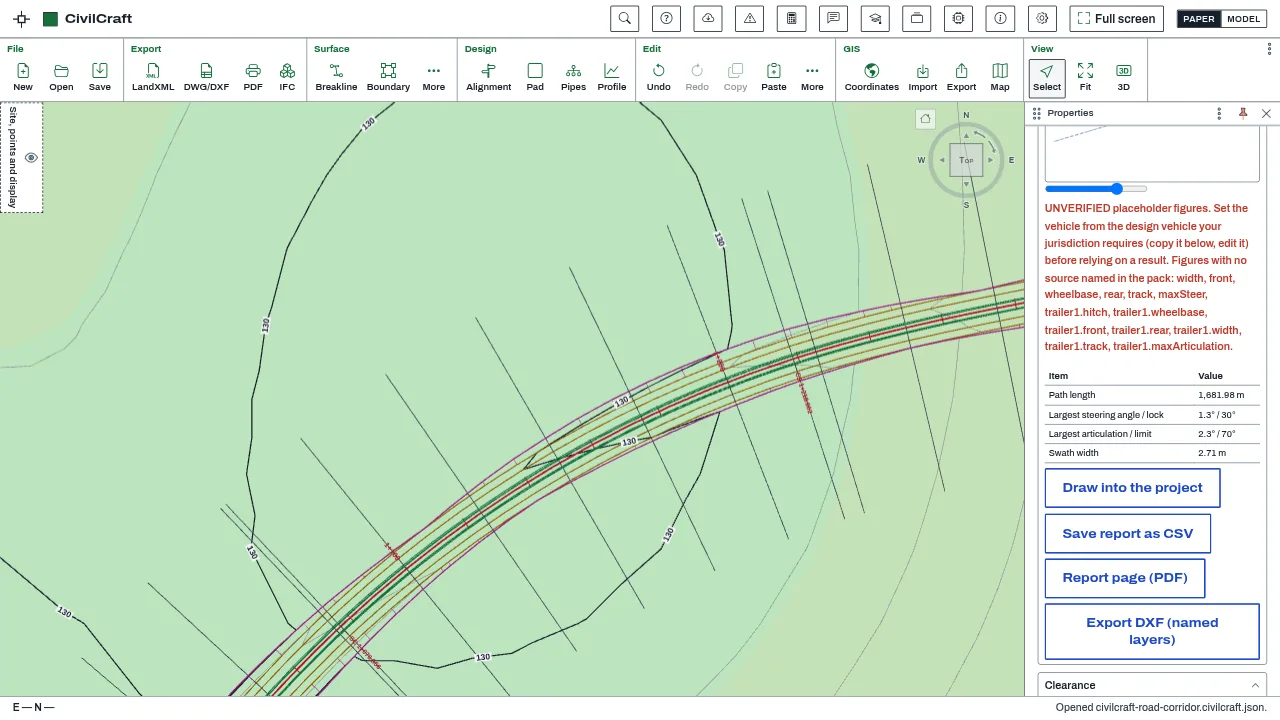
- Get a smooth envelope on a long run: a 1.68 km diagonal keeps a cell of 0.1 m or finer instead of a staircase of metres. verified
- Drive a vehicle with the cursor: click where it starts, steer with the pointer, reverse with R, and the swath builds behind it; the run can then be stamped into the project. Swept path tab, Drive with the cursor. verified
Methods and standards
Road vehicles and the aircraft's nose gear use CivilCraft's own swept path solver: each unit turns about its rear axle, the front axle or the hitch pulls the next one along an exact tractrix, and reversing follows the last axle. An aircraft adds points (wing tips, tail, engines) fixed to the main gear's frame and carried through every step. A light rail car keeps both bogies on the track line and sets the body between them, so the middle sits inside the track and the ends swing out. A clearance check tests every body outline at every step against each obstacle line or parcel, and reports the first step that comes within the margin. A roundabout is circles and leg edges, with movements as smoothed paths through the lane. Parking cuts bays from a rotated grid inside the boundary. All of it is our own code from published geometry.
Data and sources
It ships three packs of placeholder vehicles: eight road vehicle classes, two aircraft size classes and two light rail vehicles. They are rounded sizes of common classes, not copied from any one standard or manufacturer, and every one is marked unverified. Set a vehicle from the design vehicle your jurisdiction requires (copy it, edit the figures) before you rely on a result. Paths and obstacles come from the project.
A vehicle in a pack can also carry cited figures: each figure has its value and unit and where it was read (the document, the section, a link and the date). Every cited figure shows as "not checked" until a person compares it with that text and ticks it; a vehicle with cited figures is never shown as verified because its file says so. No pack of cited figures is included yet.
Verification
| Case | Result |
|---|---|
| Road vehicle run: closed forms and a straight run | A car run straight for 40 m has no steering and sweeps its width times its length; a tractor and semitrailer gives one body per unit; a bad vehicle, a bad path and a path of one point are refused with a reason (bin/test-sweptpath.mjs) |
| Aircraft on a circle against the closed form | On a 60 m circle the outer wing tip runs on sqrt((r + span/2)^2 + ahead^2) and the inner one likewise, within 0.05 m, and the nose gear steers atan(wheelbase / main gear radius) to six decimals; a 12.6 m circle needs more than the 78 degree lock and is flagged; pushback runs (bin/test-sweptpath.mjs) |
| Light rail car on a circle against the chord geometry | On a 60 m curve the body middle sits at sqrt(R^2 - (bogie centres/2)^2) and the outer end corner at sqrt((r + w/2)^2 + (b/2 + overhang)^2), within 0.01 m; two coupled cars stand one car pitch apart (bin/test-sweptpath.mjs) |
| Clearance finds the first hit and respects the margin | A wall across a 40 m run is first hit where the bumper reaches it; a line 0.9 m off the side is clear with no margin, a conflict with 1.2 m, and the closest approach is the gap less half the width; a building the vehicle enters is distance 0 (bin/test-sweptpath.mjs; the same wall in a real CivilCraf |
| Roundabout geometry and every movement | Four legs give 12 movements; the island radius is the inscribed radius less the lane and the apron; a lane wider than the circle, two legs, legs 10 degrees apart and no room for an island are refused; left-hand traffic works (bin/test-sweptpath.mjs) |
| Parking counts the same at any angle | A 40 by 20 m lot with 2.5 by 5 m bays and a 6 m aisle holds 32 bays, and the same lot turned 30 degrees holds 32 as well; a boundary of two corners or a bay of no width is refused (bin/test-sweptpath.mjs) |
| CSV quoting and the unverified flag | A vehicle name starting with = is quoted so a spreadsheet will not run it, a placeholder vehicle prints NO (placeholder), and an empty run still prints (bin/test-sweptpath.mjs) |
| Citations decide whether a vehicle is checked | A vehicle that claims checked but cites nothing is a placeholder and the uncited figures are named; every figure cited plus a source gives checked; one cited figure out of six is still a placeholder; trailer figures must be cited too (bin/test-sweptpath.mjs) |
| Step error bound | The run reports a step error in metres, halving the step cuts the bound to about a quarter, and a 40 m arc measures a tightest radius of 40 m (bin/test-sweptpath.mjs) |
| Report page | The report text says placeholder, escapes a vehicle name, prints no undefined or NaN, says not set for empty fields, and flows into a PDF through the shared report kit (bin/test-sweptpath.mjs) |
| DXF layers and jump-to | The DXF carries its layers, and a problem at station 20 jumps to the place about 20 m along (18.0000 against 18.0000); with no frames it gives no place rather than a made-up one (bin/test-sweptpath.mjs) |
| Envelope on a long alignment | A 1.68 km diagonal run keeps a cell of at most 0.1 m, the swath equals the semitrailer width of 2.6 m, mid vertices lie on the band edge within the stated error, and on a short line it agrees with the core grid within 2 percent (bin/test-sweptpath.mjs) |
| Drive with the cursor in the real page | In CivilCraft's own page, with a real mouse and keyboard, a run driven from the plan follows the pointer's trail, reverses with R, takes the last bit of the trail back, ends on a click or Enter and drops on Escape, with no console error (tools/sweptpath-engine/browser-sw4.mjs, 25 checks pass and non |
Limits
It is a design aid, not an engineering approval (a planning aid): the results are not a certificate, and an engineer decides what they are worth. It models low-speed geometry only: no dynamics, braking, speed limits, driver behaviour, or tyre scrub. Every shipped vehicle figure is a placeholder marked unverified; check them against the vehicle or table you design to. It has been tested against closed-form geometry and made-up sites, not on a real road, airport or tram design, and it has not been compared with any other program's output. Clearance is checked in plan only, with no height or vertical clearance. A roundabout also needs sight distance and entry deflection checks, which this does not do; the movements are smoothed paths, not a driver's line. Aircraft are checked on the ground at low speed, with the wing, tail and engine points you give; rail follows the track line rigidly and checks the body ends only, not a vehicle gauge against structures. Parking checks one hardest bay, with a smoothed turn from the aisle. It does not read other CAD formats for vehicles or import swept path files from other programs.
Files and formats
Reads the alignments, lines and parcels already in the project. Reads a vehicle description from a text box (a small JSON file in metres and degrees). Writes plain lines into the project (the envelope, the wheel, wing tip or bogie tracks, the start and end bodies, a roundabout, parking bays), which export to DXF and DWG like any other line, and a CSV report. Everything it draws is one step that Undo takes back.
Get started
- Switch the add-on on in Settings, Add-ons, then open the Swept path tab. Draw the path as a line (or use an alignment), and any kerbs or buildings as lines or parcels.
- Pick a vehicle, pick the path, press Run. Drag the slider to watch the vehicle move along it.
- Under Clearance tick what the vehicle must not touch, set a margin, press Check the run. Press Draw into the project to keep the envelope.
Languages
The text is available in:
- Afrikaans (af)
- Amharic (am)
- Arabic (ar)
- Azerbaijani (az)
- Belarusian (be)
- Bulgarian (bg)
- Bengali (bn)
- Bosnian (bs)
- Catalan (ca)
- Czech (cs)
- Danish (da)
- German (de)
- Dhivehi (dv)
- Greek (el)
- English (en)
- Spanish (Spain) (es-ES)
- Spanish (Mexico) (es-MX)
- Estonian (et)
- Persian (fa)
- Finnish (fi)
- Filipino (fil)
- French (fr)
- Galician (gl)
- Guarani (gn)
- Hebrew (he)
- Hindi (hi)
- Croatian (hr)
- Hungarian (hu)
- Armenian (hy)
- Indonesian (id)
- Icelandic (is)
- Italian (it)
- Japanese (ja)
- Georgian (ka)
- Kazakh (kk)
- Khmer (km)
- Korean (ko)
- Kyrgyz (ky)
- Lao (lo)
- Lithuanian (lt)
Works in
| Edition | Works | Note |
|---|---|---|
| Browser (/use) (yours) | Added on demand | Fetched the first time you use it, then kept for offline use. |
| Studio from getcadcraft.com | Added on demand | Fetched the first time you use it, then kept for offline use. |
| Microsoft Store | Added on demand | Fetched the first time you use it, then kept for offline use. |
| Google Play | Added on demand | Fetched the first time you use it, then kept for offline use. |
| iPad and iPhone (App Store) | Included; switch it on | Part of the reviewed app; your list switches it on. |
| Custom build | Added on demand | Fetched the first time you use it, then kept for offline use. |
Comes with
Nothing else.
Permissions
- Adds a panel section
- Opens or saves its own file types
- Adds its own objects and data to drawings
- Uses "problems"
From its manifest. Shown again when an update changes them, and the update waits for your yes.
Versions
| Version | Channel | Date | What changed |
|---|---|---|---|
| 0.10.0 | stable | November 17, 2026 | Signed and published. |
Licence and maker
CadCraft (CadCraft, first-party). Licence: Apache-2.0. Dependencies carry their own licences, listed on their pages.