Feature
5D cost
Costs on the 4D schedule.
Use this add-on:
Overview
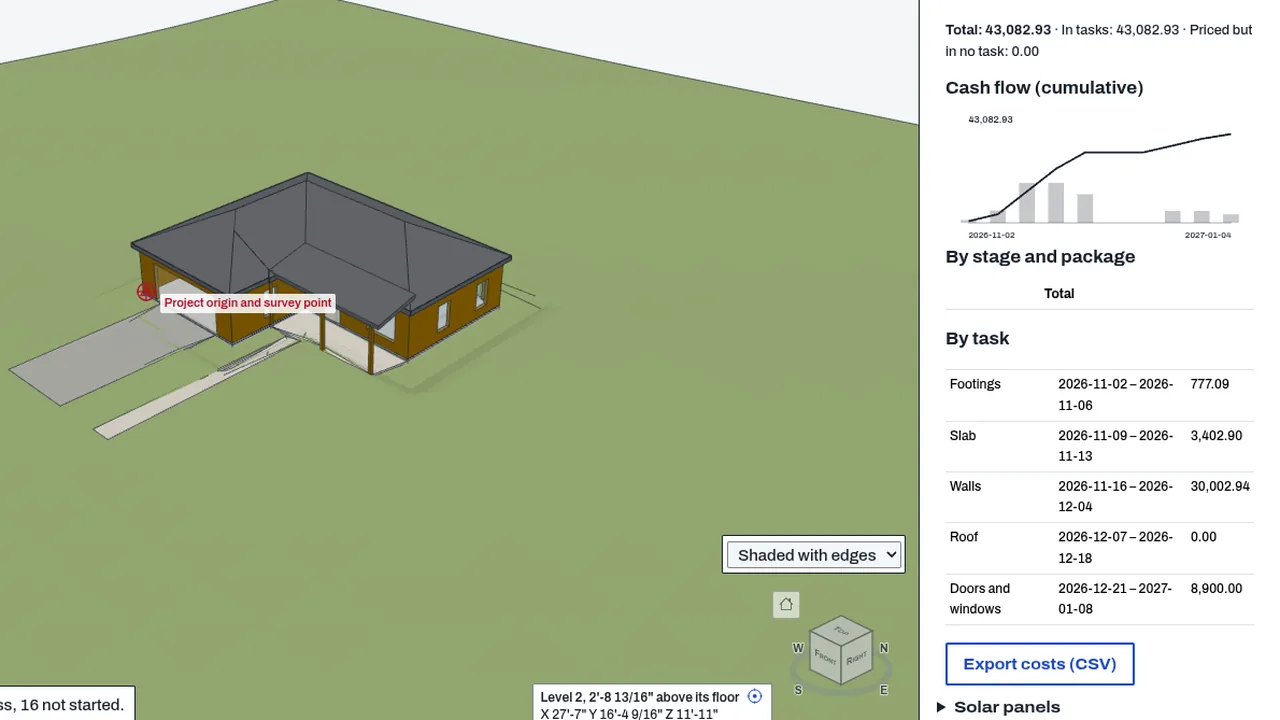
5D cost prices the elements of a BimCraft model against its 4D schedule. Each task's elements get a cost from a price table you supply, the cost is spread over the task's days, and the Cost pane draws the cumulative cash-flow curve by day, week or month. It can also compare planned and built cost on a date. Nothing is priced until you give prices; none ship with it. Today it is part of BimCraft's core.
Who it’s for
- Cost estimators and planners: a cash-flow curve from the schedule and your own rates.
- Project controls staff: planned against built cost on a chosen date, with progress you type for each task.
- TakeoffCraft users: bring their takeoff rates in as the price table.
What you can do
- Open the Cost pane beside the 4D schedule.
- Give prices by typing them, importing a CSV or JSON file, or bringing TakeoffCraft's rates.
- Map each price to model materials and classes with keywords, so every element finds its price.
- Spread a task's cost evenly, front-loaded, back-loaded or bell-shaped over its days.
- Read the cash-flow curve by day, week or month, and the cost by stage and work package.
- Value a date: the planned and built cost, with the progress you type for each task.
- Export the cost table as CSV; the prices are kept in the file.
Methods and standards
Cost of an element is quantity × (1 + waste) × material rate, plus quantity × labour rate. Each task's cost is spread over its days by the chosen profile, in whole cents so the days add up to the task's cost exactly. An element in more than one task is split evenly between them, so no cost is counted twice. Quantities come from the same element reader as embodied carbon.
Data and sources
No prices are shipped. The price table is yours: type it, import it, or bring TakeoffCraft's rates. Each row has a unit, a material rate, a labour rate, a waste allowance and a source note. The 4D tasks come from the schedule in the model.
Verification
bin/test-bimcraft.mjs --carbon (tools/bimcraft-test/eg-carbon-test.mjs) checks the price table, the spread of a task's cost over its days, the cash-flow curve, and the stages and packages, with figures worked by hand. Not yet checked against a reference cost estimate.
Limits
This is not a cost estimate, a bid or a valuation. It spreads your rates over the schedule the model holds. Built progress is what you type for each task, not a measurement. Elements with no price, or not on the schedule, are listed as unpriced or unscheduled, and are not counted as zero.
Files and formats
Reads the open IFC model and its 4D tasks in BimCraft. Keeps the price table and the spread profile in the model's project property set (CadCraft_Cost5D). Reads and writes price CSV and JSON files, and exports the cost table as CSV.
Get started
- Set up the 4D schedule, with its tasks linked to the model's elements.
- Open the Cost pane and give prices: type them, import a CSV or JSON file, or bring TakeoffCraft's rates.
- Map the price keywords to the model's materials, then read the cash-flow curve and export the CSV.
Languages
No languages are listed for this add-on yet. Its maker may add some.
Works in
| Edition | Works | Note |
|---|---|---|
| Browser (/use) (yours) | Added on demand | Fetched the first time you use it, then kept for offline use. |
| Studio from getcadcraft.com | Added on demand | Fetched the first time you use it, then kept for offline use. |
| Microsoft Store | Added on demand | Fetched the first time you use it, then kept for offline use. |
| Google Play | Added on demand | Fetched the first time you use it, then kept for offline use. |
| iPad and iPhone (App Store) | Included; switch it on | Part of the reviewed app; your list switches it on. |
| Custom build | Added on demand | Fetched the first time you use it, then kept for offline use. |
Comes with
- Schedules and cost 400 KB
Adding it brings these too. Engines are shared: each downloads once for every add-on that uses it.
Needed by: Construction engineering and management.
Versions
| Version | Channel | Date | What changed |
|---|---|---|---|
| 1.0.0 | stable | October 28, 2026 | First version in the Library. |
Licence and maker
CadCraft (CadCraft, first-party). Licence: Apache-2.0. Dependencies carry their own licences, listed on their pages.