Feature
Plant 3D
Equipment with nozzles, routing, isometrics.
Use this add-on:
Overview
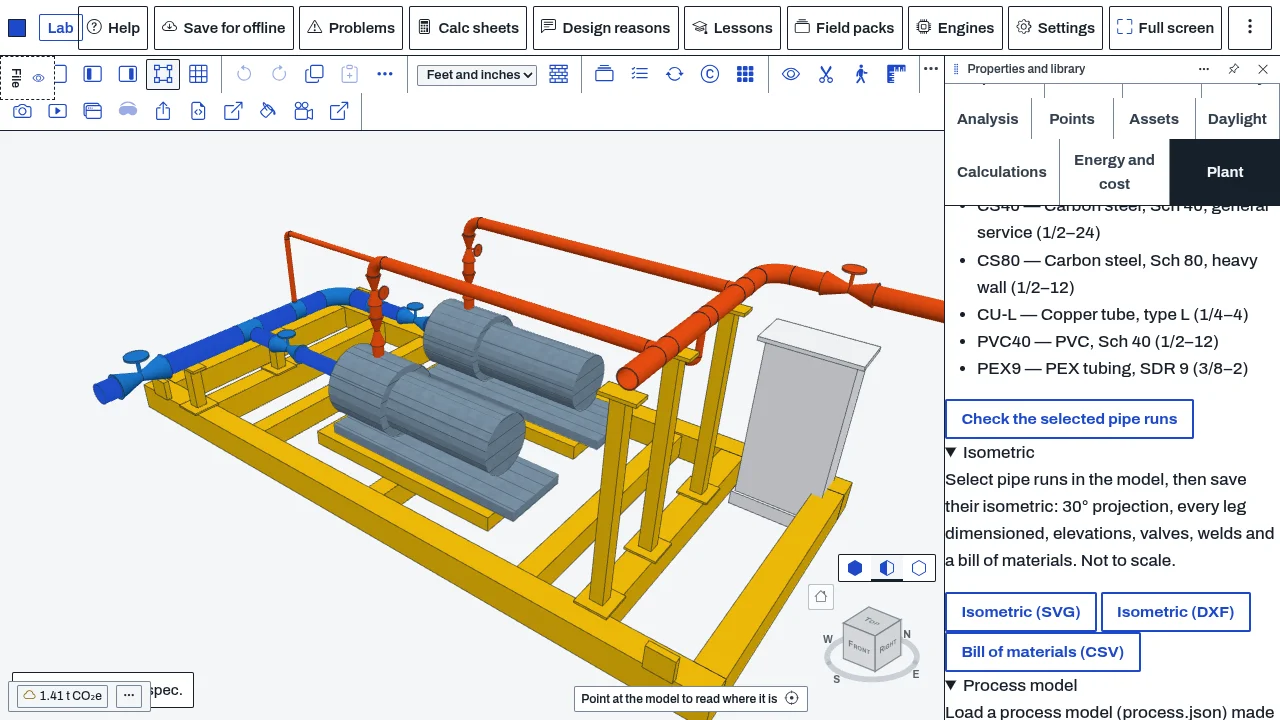
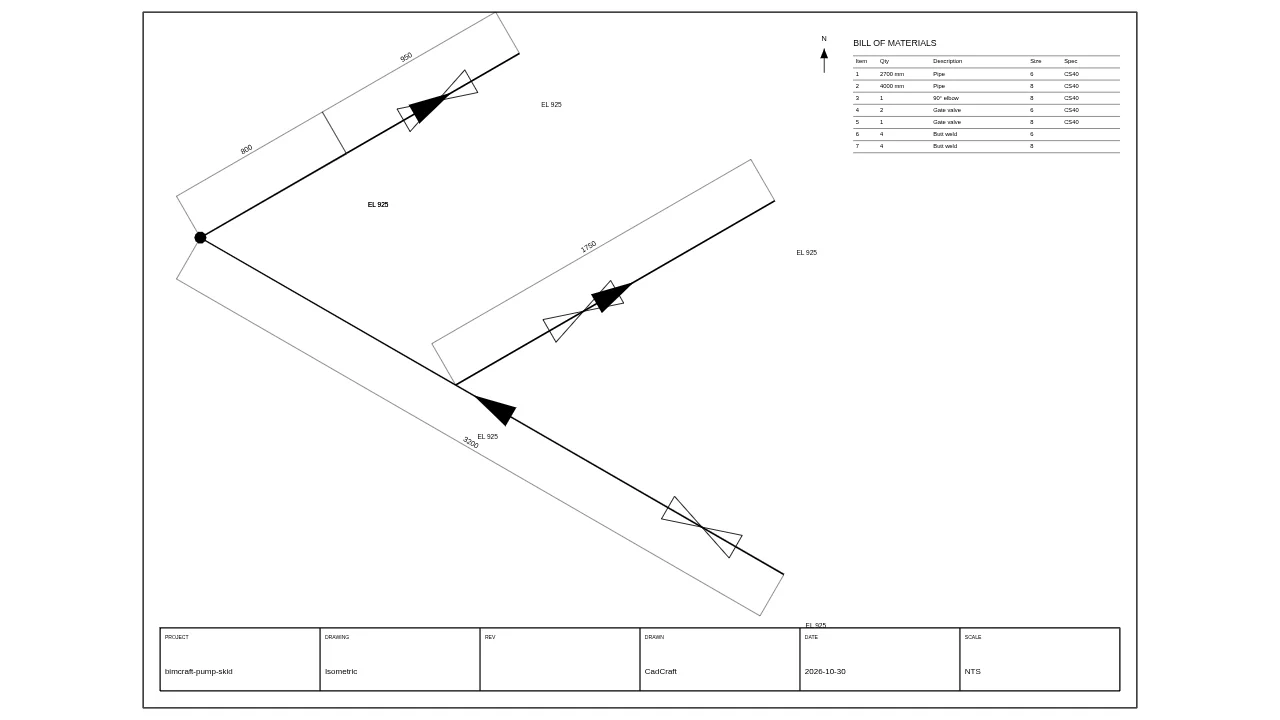
Plant adds process and factory work to BimCraft. It checks pipe runs in the model against pipe specs, draws isometric drawings of pipe runs with a bill of materials and spool numbers, places generic process equipment with nozzles (saved as an IFC file, or placed in the open model), finds a route for a pipe between two nozzles, checks the layout of aisles and floor load, and checks the pipe runs against a process model for line velocity and pressure drop. It is a drafting aid, not an engineering approval.
Who it’s for
- Plant and process designers: pipe runs laid out against a spec book, with the spec checked in the model.
- Piping designers: isometric drawings with a bill of materials and spool balloons.
- Layout planners: a check of aisles, the space beside each item and floor load.
- Process engineers: line velocity and pressure drop read from the pipe as drawn, against a process model.
What you can do
- Check selected pipe runs against their spec with Check the selected pipe runs in the Plant tab, or see one run's spec in its Properties (Pipe spec section).
- Save the isometric of selected pipe runs as SVG or DXF (Export, then Isometric of the selected pipe runs) and the bill of materials as CSV.
- Add generic equipment in the Plant tab: vertical and horizontal vessel, storage tank, column, centrifugal pump, shell and tube exchanger, plate exchanger. Save the table as an IFC file (Save as IFC file), or press Place to write an item into the open model.
- Route a pipe: Route a pipe, choose two ports, a spec and a size, press Find a route, then Draw this run to put the route in the model as a pipe run.
- Check the layout with Check the layout: overlapping items, aisles narrower than your limit, the space beside each item, and floor load over your limit.
- Load a process model (process.json) in the Process model section and press Check the runs. Each line's velocity and pressure drop are listed, and anything that disagrees appears in the Problems panel.
Methods and standards
Pipe sizes and walls come from the public size tables: ASME B36.10M (steel), ASTM B88 (copper), ASTM D1785 (PVC) and ASTM F876 (PEX). Starter specs are CS40, CS80, CU-L, PVC40 and PEX9. A long-radius elbow's centre line is 1.5 times its nominal size; a short one is one nominal size. Branches of 4:1, 2:1 and 1:1 are made as the spec gives. The router runs only along X, Y and Z, leaves each nozzle straight out, and never bends twice within two pipe diameters (at least 150 mm). Isometrics use a 30 degree projection. Line velocity and pressure drop come from the run's length, its elbows, valves, rise and size; viscosity is an assumed default until the line gives one, and the result says so.
Data and sources
Five pipe specs come with the add-on, written from the public size tables; a plant's own spec book overrides them. Equipment shapes are generic, drawn in the right proportions with no maker's dimensions. The aisle, clearance and floor-load limits are numbers you set; the starting values are 900 mm for aisles, 800 mm in front of an item, 300 mm elsewhere, and 1000 kg/m2 for floor load.
Verification
The add-on's Node tests in public_html/assets/apps/bimcraft/dev/addons/plant/test/ (test.mjs, t-process.mjs, t-addon.mjs). Run on 2026-10-29: test.mjs 108 passed, 0 failed. The browser test tools/addons-test/browser-plant.mjs was recorded at 24 passed, 0 failed in the lab on 2026-10-27 (docs/0.8-sessions/mep-08.md). The engineering review of the starter specs and equipment shapes is still open (docs/0.8-sessions/mep-08.md). Not yet checked against a reference case.
Limits
A drafting aid. Specs, equipment shapes and limits are generic. The router draws a route between the two ports you pick; it does not size the pipe or check it against a pressure or temperature. The model changes only when you press Place or Draw this run (each is one undo step). Placing equipment in the model and the router's list of ports need BimCraft's add-on API 1.1; in an older build the equipment goes out as its own IFC file. Isometrics are not to scale and say so on the drawing. Process checks use the viscosity default until a line has its own value.
Files and formats
Reads and writes IFC. The equipment table saves as an IFC4 file, one class per item, with a port at each nozzle; a placed item carries the CadCraft_Plant property set and a CadCraft_Port property set at each nozzle. Reads and writes a process.json process model. Writes isometrics as SVG or DXF (layers ISO-PIPE, ISO-DIM, ISO-SYMBOL, ISO-TEXT, ISO-BOM and ISO-FRAME) and the bill of materials as CSV. The equipment table is kept in this browser.
Get started
- Open Settings, General, Add-ons and switch on Plant.
- Open the Plant tab, add a pump and a tank, and press Place on each row to write them into the model.
- Select one or more pipe runs, then Export, then Isometric of the selected pipe runs.
Languages
The text is available in:
- Afrikaans (af)
- Amharic (am)
- Arabic (ar)
- Azerbaijani (az)
- Belarusian (be)
- Bulgarian (bg)
- Bengali (bn)
- Bosnian (bs)
- Catalan (ca)
- Czech (cs)
- Danish (da)
- German (de)
- Dhivehi (dv)
- Greek (el)
- English (en)
- Spanish (Spain) (es-ES)
- Spanish (Mexico) (es-MX)
- Estonian (et)
- Persian (fa)
- Finnish (fi)
- Filipino (fil)
- French (fr)
- Galician (gl)
- Guarani (gn)
- Hebrew (he)
- Hindi (hi)
- Croatian (hr)
- Hungarian (hu)
- Armenian (hy)
- Indonesian (id)
- Icelandic (is)
- Italian (it)
- Japanese (ja)
- Georgian (ka)
- Kazakh (kk)
- Khmer (km)
- Korean (ko)
- Kyrgyz (ky)
- Lao (lo)
- Lithuanian (lt)
Works in
| Edition | Works | Note |
|---|---|---|
| Browser (/use) (yours) | Added on demand | Fetched the first time you use it, then kept for offline use. |
| Studio from getcadcraft.com | Added on demand | Fetched the first time you use it, then kept for offline use. |
| Microsoft Store | Added on demand | Fetched the first time you use it, then kept for offline use. |
| Google Play | Added on demand | Fetched the first time you use it, then kept for offline use. |
| iPad and iPhone (App Store) | Included; switch it on | Part of the reviewed app; your list switches it on. |
| Custom build | Added on demand | Fetched the first time you use it, then kept for offline use. |
Comes with
- Piping 1.8 MB
- Networks engine 700 KB
Adding it brings these too. Engines are shared: each downloads once for every add-on that uses it.
Needed by: Pipe stress, Piping and plant design.
Permissions
- Adds commands
- Adds a panel section
- Opens or saves its own file types
- Keeps its own settings in this browser
From its manifest. Shown again when an update changes them, and the update waits for your yes.
Versions
| Version | Channel | Date | What changed |
|---|---|---|---|
| 0.8.0 | stable | November 7, 2026 | Signed and published. |
Licence and maker
CadCraft (CadCraft, first-party). Licence: Apache-2.0. Dependencies carry their own licences, listed on their pages.